# Code mode analytics agent
> [!NOTE]
> Code available [here](https://github.com/unionai/unionai-examples/tree/main/v2/tutorials/code_mode_agent).
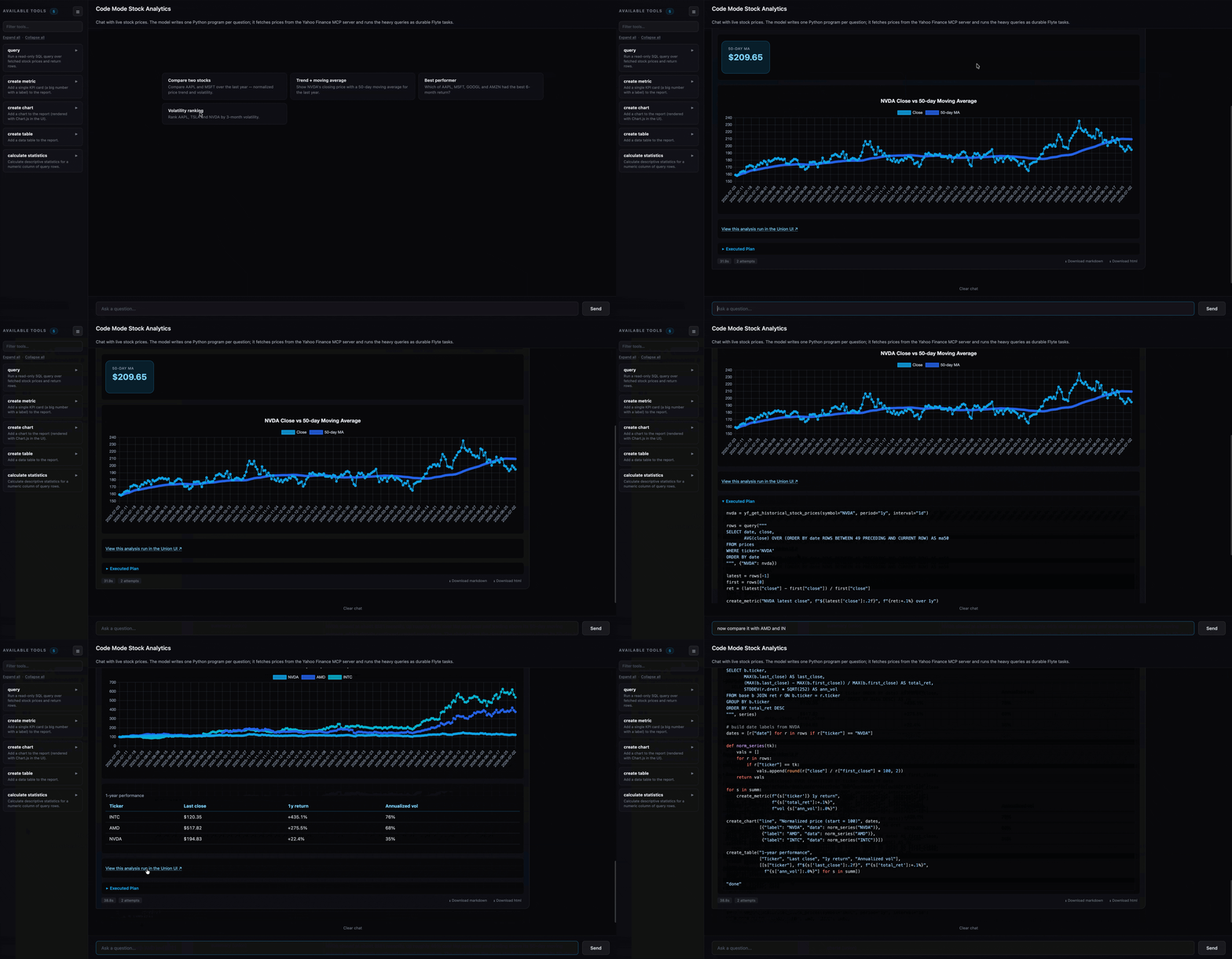
This tutorial builds a "chat with live market data" app on Flyte's native AI stack. You ask a question in the browser, and the app launches a Flyte run to answer it. Inside that run, `flyte.ai.agents.Agent` running in code mode has Claude write one small Python program, the program executes in Flyte's [Monty sandbox](https://www.union.ai/docs/v2/union/user-guide/sandboxing/code-sandboxing/page.md), and the only things it can touch are the tools you registered. It fetches daily stock prices from a Yahoo Finance server plugged in over MCP, and hands them to a DuckDB `query` — a durable Flyte task, so every query the model writes shows up as a tracked, retryable child task you can open in the UI. The cheap tools that render metrics, charts, and tables run in-process. And the web layer is not hand-built either: `flyte.ai.chat.AgentChatAppEnvironment` provides the chat UI, the streaming, and the run-per-question wiring in one declaration.
## Why code mode
Most tool-using agents call tools one at a time. The model asks for a tool, the result comes back, it reasons, it asks for the next one. For anything multi-step that turns into a lot of round-trips, and the orchestration logic lives in a loop you have to babysit.
In [code mode](https://www.union.ai/docs/v2/union/user-guide/sandboxing/code-mode/page.md), the model writes a single program that orchestrates the tools instead, with real control flow and composition. A question like "compare three tickers, indexed to 100 at the start, then rank them by volatility" becomes one script that does a few fetches and runs one query. It doesn't glue togther a dozen tools with model turns.
The code runs inside Monty, a restricted interpreter with no imports, no filesystem access, no network access, and near-instant startup. It can only use the tools you explicitly make available to the sandbox. That means the model isn't running arbitrary Python with unrestricted access. It can only work within the boundaries you've defined.
## What runs where
The example splits work by how expensive and how worth-tracking each piece is.
| Piece | Where it runs | Why |
|---|---|---|
| the chat app | a CPU app pod | The native chat UI. Streams progress and launches one analysis run per question. |
| `analyze` | a Flyte task (the run) | Starts a report, runs the agent loop, returns the report blocks and a summary. |
| `yf_get_historical_stock_prices` | the MCP server subprocess | Live price fetch: the agent's only path to the network. Loaded over MCP; the model calls it from its code like any other function. |
| `query(sql, series)` | a durable child task | Parses the fetched price JSON into a `prices` table and runs read-only DuckDB SQL. Real work worth tracking, retrying, and caching. Dispatched from inside the sandbox. |
| `create_metric`, `create_chart`, `create_table`, `calculate_statistics` | in-process in `analyze` | Microseconds of pure Python. Making them tasks would add a round-trip for nothing. |
| the model's code | the Monty sandbox | Untrusted LLM code, confined to calling the tools above. |
## The heavy tool: a durable query
The agent fetches prices at runtime from a Yahoo Finance MCP server (covered below). Each fetch returns one ticker's closing prices as a JSON string; `query` parses those into a `prices(ticker, date, close)` table and runs read-only DuckDB SQL against it, coercing dates to ISO strings on the way out. The reshape lives in the task, not the sandbox, because the sandbox has no `json` or `pandas`:
```
"""Tools and data access for the Code Mode stock-analysis agent.
The agent (``flyte.ai.agents.Agent`` in ``code_mode``) writes Python
orchestration code that calls these tools; that code runs in the Monty
sandbox, which allows no imports, no IO, and no network, so the only things the
generated code can touch are the tools registered in ``analysis.py``.
Two kinds of tools, on purpose:
* The **fetch** is a Yahoo Finance MCP tool (``yf_get_historical_stock_prices``),
registered on the agent via ``mcp_servers`` in ``analysis.py``. It is the only
path to the network — the sandbox has none — so it is the agent's live data
source. It returns a raw JSON *string* of closing prices; the sandbox does not
parse it (it has no ``json``), it just hands it to ``query``.
* ``query`` runs read-only DuckDB SQL over the fetched series. In ``analysis.py``
it is a durable ``@env.task``, so the heavy analytics (moving averages,
volatility, drawdowns, cross-ticker joins) run as a tracked, cached Flyte task.
It parses the raw MCP strings into a ``prices`` table before running the SQL —
the messy reshape lives here, where pandas is available, not in the sandbox.
* ``create_metric``, ``create_chart``, ``create_table``, and
``calculate_statistics`` are cheap, pure-Python helpers that run in-process.
The ``create_*`` ones render HTML blocks into a per-run report collector.
To add a tool: write a function with type annotations and a docstring, then add
it to the agent's ``tools`` list in ``analysis.py``. The agent generates its
system prompt from the signatures and docstrings, so there is nothing else to
wire up.
"""
from __future__ import annotations
import contextvars
import datetime as _dt
import json as _json
import math
import uuid
CHART_COLORS = [
"rgba(14, 165, 233, 0.8)", # #0ea5e9 — sky
"rgba(37, 99, 235, 0.8)", # #2563eb — blue
"rgba(6, 182, 212, 0.8)", # #06b6d4 — cyan
"rgba(99, 102, 241, 0.8)", # #6366f1 — indigo
"rgba(8, 145, 178, 0.8)", # #0891b2 — deep cyan
]
CHART_BORDERS = ["#0ea5e9", "#2563eb", "#06b6d4", "#6366f1", "#0891b2"]
# Dataset — live stock closing prices, fetched via the Yahoo Finance MCP server
#
# There is no local data to fetch: the agent pulls prices at runtime from the
# `mcp-yahoo-finance` server (registered in `analysis.py`). This description is
# injected into the system prompt so the model knows how the two heavy tools fit
# together without a round-trip.
DATA_DESCRIPTION = (
"You analyze daily stock closing prices. There are two heavy tools.\n"
"\n"
"Fetching (one ticker per call, via the Yahoo Finance MCP server):\n"
" yf_get_historical_stock_prices(symbol=..., period='1y', interval='1d')\n"
" returns a JSON *string* of closing prices keyed by timestamp. Do NOT parse\n"
" it in your code — the sandbox has no json or datetime module. Pass the\n"
" string straight to query(). Call it once per ticker (await each call) and\n"
" collect the returned strings into a dict for query(). Valid period: 1mo,\n"
" 3mo, 6mo, 1y, 2y, 5y, ytd, max. Valid interval: 1d, 1wk, 1mo.\n"
"\n"
"Analyzing (durable DuckDB task):\n"
" query(sql, series) where `series` maps each ticker symbol to the JSON\n"
" string returned by yf_get_historical_stock_prices for it. The task parses\n"
" those into one table:\n"
" prices(ticker TEXT, date DATE, close DOUBLE)\n"
" Write a single read-only SELECT against `prices`. Do the math in SQL:\n"
" window functions (AVG(...) OVER (PARTITION BY ticker ORDER BY date ...))\n"
" for moving averages, LAG(...) for daily returns, STDDEV for volatility,\n"
" and GROUP BY / self-joins for cross-ticker comparisons."
)
def _jsonable(value: object) -> object:
"""Coerce DuckDB scalars to JSON-friendly Python types."""
if isinstance(value, (_dt.date, _dt.datetime)):
return value.isoformat()
return value
# {{docs-fragment collector}}
# The native code-mode loop ends in a plain-text answer, but the UI renders
# structured HTML blocks. A per-run collector bridges the two: each render tool
# appends its HTML here as a side effect, and the `analyze` task reads the blocks
# back after the agent finishes. A ContextVar keeps concurrent runs isolated.
_REPORT: contextvars.ContextVar[list | None] = contextvars.ContextVar(
"report", default=None
)
def start_report() -> None:
"""Begin a fresh report for this run (called by `analyze` before the agent)."""
_REPORT.set([])
def collect_report() -> list[str]:
"""Return the HTML blocks rendered so far, in the order they were created."""
return list(_REPORT.get() or [])
def _add_block(html: str) -> None:
blocks = _REPORT.get()
if blocks is not None:
blocks.append(html)
# {{/docs-fragment collector}}
# {{docs-fragment sql_guard}}
# The tool is a safety boundary. The model can only call the tools you register, so
# narrowing what a tool accepts shrinks the blast radius. `query` allows a single
# read-only SELECT and nothing else. DuckDB's own parser classifies the statement, so
# there is no brittle keyword matching to trip over identifiers or string literals.
def _ensure_read_only(con, sql: str) -> None:
import duckdb
statements = con.extract_statements(sql)
if len(statements) != 1 or statements[0].type != duckdb.StatementType.SELECT:
raise ValueError("Only a single read-only SELECT query is allowed.")
# {{/docs-fragment sql_guard}}
# {{docs-fragment query_tool}}
async def run_sql(sql: str, series: dict[str, str]) -> list:
"""Parse raw Yahoo Finance price JSON per ticker, then run a read-only query.
Args:
sql: A DuckDB SELECT statement against the table `prices`
(columns: ticker, date, close). Aggregate in SQL where you can.
series: Maps ticker symbol -> the JSON string returned by
yf_get_historical_stock_prices for it (closing prices keyed by
epoch-millisecond timestamp).
Returns:
A list of row dicts (one per result row), with dates as ISO strings.
"""
import duckdb
import pandas as pd
# Parse each ticker's raw MCP payload into rows and stack them into one table.
# This reshape needs json + pandas, which the Monty sandbox lacks — so it runs
# here, in the durable task, not in the model's generated code.
frames = []
for ticker, raw in series.items():
data = _json.loads(raw) if raw else {}
if not data:
continue
frame = pd.DataFrame({"ts": list(data.keys()), "close": list(data.values())})
# The MCP keys its close prices by timestamp, but the format varies by
# pandas version inside the server: ISO date strings ("2025-07-03") or
# epoch-millisecond integers. Detect which and parse accordingly.
ts = frame["ts"].astype(str)
if ts.str.fullmatch(r"\d+").all():
frame["date"] = pd.to_datetime(ts.astype("int64"), unit="ms").dt.date
else:
frame["date"] = pd.to_datetime(ts).dt.date
frame["ticker"] = ticker
frames.append(frame[["ticker", "date", "close"]])
prices = (
pd.concat(frames, ignore_index=True)
if frames
else pd.DataFrame(columns=["ticker", "date", "close"])
)
# Lock the engine down: no reading or writing files, no extensions, no network.
con = duckdb.connect(config={"enable_external_access": "false"})
_ensure_read_only(con, sql)
con.register("prices", prices)
rel = con.execute(sql)
columns = [d[0] for d in rel.description]
return [{c: _jsonable(v) for c, v in zip(columns, row)} for row in rel.fetchall()]
# {{/docs-fragment query_tool}}
async def calculate_statistics(rows: list, column: str) -> dict:
"""Calculate descriptive statistics for a numeric column of query rows.
Args:
rows: A list of row dicts, e.g. the output of query().
column: Name of the numeric column to analyze.
Returns:
Dict with keys: count, mean, median, min, max, std_dev.
"""
vals = [row[column] for row in rows if column in row and row[column] is not None]
if not vals:
return {"count": 0, "mean": 0, "median": 0, "min": 0, "max": 0, "std_dev": 0}
n = len(vals)
mean = sum(vals) / n
ordered = sorted(vals)
median = (
ordered[n // 2] if n % 2 == 1 else (ordered[n // 2 - 1] + ordered[n // 2]) / 2
)
variance = sum((v - mean) ** 2 for v in vals) / n
return {
"count": n,
"mean": round(mean, 2),
"median": round(median, 2),
"min": min(vals),
"max": max(vals),
"std_dev": round(math.sqrt(variance), 2),
}
async def create_chart(chart_type: str, title: str, labels: list, values: list) -> str:
"""Add a chart to the report (rendered with Chart.js in the UI).
Blocks appear in the report in the order the create_* tools are called.
Args:
chart_type: One of "bar", "line", "pie", "doughnut".
title: Chart title displayed above the canvas.
labels: X-axis labels (or slice labels for pie/doughnut).
values: Either a flat list of numbers, or a list of
{"label": str, "data": list[number]} dicts for multi-series.
Returns:
A short confirmation string.
"""
if not values:
return f"chart {title!r} skipped: no data to plot"
if isinstance(values[0], dict):
datasets = []
for i, series in enumerate(values):
idx = i % len(CHART_COLORS)
datasets.append(
{
"label": series["label"],
"data": series["data"],
"backgroundColor": CHART_COLORS[idx],
"borderColor": CHART_BORDERS[idx],
"borderWidth": 2,
"tension": 0.3,
"fill": False,
}
)
else:
bg = [CHART_COLORS[i % len(CHART_COLORS)] for i in range(len(values))]
border = [CHART_BORDERS[i % len(CHART_BORDERS)] for i in range(len(values))]
datasets = [
{
"label": title,
"data": values,
"backgroundColor": (
bg if chart_type in ("pie", "doughnut") else CHART_COLORS[0]
),
"borderColor": (
border if chart_type in ("pie", "doughnut") else CHART_BORDERS[0]
),
"borderWidth": 2,
"tension": 0.3,
"fill": chart_type == "line",
}
]
# Light text and faint grid lines so the chart reads on the chat UI's dark theme
# (Chart.js defaults to dark grey text, which disappears on a near-black page).
options: dict = {
"responsive": True,
"maintainAspectRatio": False,
"plugins": {
"title": {
"display": True,
"text": title,
"font": {"size": 16},
"color": "#e5e7eb",
},
"legend": {"labels": {"color": "#cbd5e1"}},
},
}
if chart_type in ("bar", "line"):
options["scales"] = {
axis: {
"ticks": {"color": "#94a3b8"},
"grid": {"color": "rgba(148,163,184,0.15)"},
}
for axis in ("x", "y")
}
config = {
"type": chart_type,
"data": {"labels": labels, "datasets": datasets},
"options": options,
}
# A self-contained canvas plus the script that instantiates it. The chat UI injects
# each block's HTML and re-runs its "
)
return f"chart {title!r} added to the report"
async def create_metric(label: str, value: str, delta: str = "") -> str:
"""Add a single KPI card (a big number with a label) to the report.
Use for headline figures, e.g. latest price or period return. Consecutive
metric cards lay out in a row. Blocks appear in the order the tools are called.
Args:
label: Short caption, e.g. "AAPL return".
value: The formatted value to display, e.g. "$185.64" or "+12%".
delta: Optional change note, e.g. "+8% vs last month".
Returns:
A short confirmation string.
"""
# Always render the delta line (blank when there is no delta) so every card is the
# same height whether or not a delta was passed, and a row of cards stays aligned.
# Colors are tuned for the chat UI's dark theme.
delta_html = f'{delta or " "}
'
_add_block(
''
f'
{label}
'
f'
{value}
'
f"{delta_html}
{h} | '
for h in headers
)
body = "".join(
""
+ "".join(
f'| {c} | '
for c in row
)
+ "
"
for row in rows
)
_add_block(
'"
)
return f"table {title!r} added to the report ({len(rows)} rows)"
```
*Source: https://github.com/unionai/unionai-examples/blob/main/v2/tutorials/code_mode_agent/tools.py*
The model does the analytics in SQL. It uses window functions for moving averages, `LAG` for daily returns, `STDDEV` for volatility, rather than looping in Python.
## Tools are a safety boundary
Restricting the model to a fixed set of tools is one layer of safety. The tool itself is a second. Because the model can only ever call the tools you register, narrowing what each tool accepts shrinks the whole system's surface area.
`query` is a good example. The sandbox confines the orchestration code, but the SQL string still runs against real DuckDB, which can read and write local files, install extensions, and reach the network. So the tool adds two of DuckDB's own controls: it opens the connection with external access disabled (no files, no extensions, no network), and it uses DuckDB's parser to classify the statement and reject anything that is not a single read-only SELECT. A `DELETE` or `DROP` is rejected as a non-SELECT; a `read_csv('/etc/passwd')` parses as a SELECT but is stopped by the disabled external access.
```
"""Tools and data access for the Code Mode stock-analysis agent.
The agent (``flyte.ai.agents.Agent`` in ``code_mode``) writes Python
orchestration code that calls these tools; that code runs in the Monty
sandbox, which allows no imports, no IO, and no network, so the only things the
generated code can touch are the tools registered in ``analysis.py``.
Two kinds of tools, on purpose:
* The **fetch** is a Yahoo Finance MCP tool (``yf_get_historical_stock_prices``),
registered on the agent via ``mcp_servers`` in ``analysis.py``. It is the only
path to the network — the sandbox has none — so it is the agent's live data
source. It returns a raw JSON *string* of closing prices; the sandbox does not
parse it (it has no ``json``), it just hands it to ``query``.
* ``query`` runs read-only DuckDB SQL over the fetched series. In ``analysis.py``
it is a durable ``@env.task``, so the heavy analytics (moving averages,
volatility, drawdowns, cross-ticker joins) run as a tracked, cached Flyte task.
It parses the raw MCP strings into a ``prices`` table before running the SQL —
the messy reshape lives here, where pandas is available, not in the sandbox.
* ``create_metric``, ``create_chart``, ``create_table``, and
``calculate_statistics`` are cheap, pure-Python helpers that run in-process.
The ``create_*`` ones render HTML blocks into a per-run report collector.
To add a tool: write a function with type annotations and a docstring, then add
it to the agent's ``tools`` list in ``analysis.py``. The agent generates its
system prompt from the signatures and docstrings, so there is nothing else to
wire up.
"""
from __future__ import annotations
import contextvars
import datetime as _dt
import json as _json
import math
import uuid
CHART_COLORS = [
"rgba(14, 165, 233, 0.8)", # #0ea5e9 — sky
"rgba(37, 99, 235, 0.8)", # #2563eb — blue
"rgba(6, 182, 212, 0.8)", # #06b6d4 — cyan
"rgba(99, 102, 241, 0.8)", # #6366f1 — indigo
"rgba(8, 145, 178, 0.8)", # #0891b2 — deep cyan
]
CHART_BORDERS = ["#0ea5e9", "#2563eb", "#06b6d4", "#6366f1", "#0891b2"]
# Dataset — live stock closing prices, fetched via the Yahoo Finance MCP server
#
# There is no local data to fetch: the agent pulls prices at runtime from the
# `mcp-yahoo-finance` server (registered in `analysis.py`). This description is
# injected into the system prompt so the model knows how the two heavy tools fit
# together without a round-trip.
DATA_DESCRIPTION = (
"You analyze daily stock closing prices. There are two heavy tools.\n"
"\n"
"Fetching (one ticker per call, via the Yahoo Finance MCP server):\n"
" yf_get_historical_stock_prices(symbol=..., period='1y', interval='1d')\n"
" returns a JSON *string* of closing prices keyed by timestamp. Do NOT parse\n"
" it in your code — the sandbox has no json or datetime module. Pass the\n"
" string straight to query(). Call it once per ticker (await each call) and\n"
" collect the returned strings into a dict for query(). Valid period: 1mo,\n"
" 3mo, 6mo, 1y, 2y, 5y, ytd, max. Valid interval: 1d, 1wk, 1mo.\n"
"\n"
"Analyzing (durable DuckDB task):\n"
" query(sql, series) where `series` maps each ticker symbol to the JSON\n"
" string returned by yf_get_historical_stock_prices for it. The task parses\n"
" those into one table:\n"
" prices(ticker TEXT, date DATE, close DOUBLE)\n"
" Write a single read-only SELECT against `prices`. Do the math in SQL:\n"
" window functions (AVG(...) OVER (PARTITION BY ticker ORDER BY date ...))\n"
" for moving averages, LAG(...) for daily returns, STDDEV for volatility,\n"
" and GROUP BY / self-joins for cross-ticker comparisons."
)
def _jsonable(value: object) -> object:
"""Coerce DuckDB scalars to JSON-friendly Python types."""
if isinstance(value, (_dt.date, _dt.datetime)):
return value.isoformat()
return value
# {{docs-fragment collector}}
# The native code-mode loop ends in a plain-text answer, but the UI renders
# structured HTML blocks. A per-run collector bridges the two: each render tool
# appends its HTML here as a side effect, and the `analyze` task reads the blocks
# back after the agent finishes. A ContextVar keeps concurrent runs isolated.
_REPORT: contextvars.ContextVar[list | None] = contextvars.ContextVar(
"report", default=None
)
def start_report() -> None:
"""Begin a fresh report for this run (called by `analyze` before the agent)."""
_REPORT.set([])
def collect_report() -> list[str]:
"""Return the HTML blocks rendered so far, in the order they were created."""
return list(_REPORT.get() or [])
def _add_block(html: str) -> None:
blocks = _REPORT.get()
if blocks is not None:
blocks.append(html)
# {{/docs-fragment collector}}
# {{docs-fragment sql_guard}}
# The tool is a safety boundary. The model can only call the tools you register, so
# narrowing what a tool accepts shrinks the blast radius. `query` allows a single
# read-only SELECT and nothing else. DuckDB's own parser classifies the statement, so
# there is no brittle keyword matching to trip over identifiers or string literals.
def _ensure_read_only(con, sql: str) -> None:
import duckdb
statements = con.extract_statements(sql)
if len(statements) != 1 or statements[0].type != duckdb.StatementType.SELECT:
raise ValueError("Only a single read-only SELECT query is allowed.")
# {{/docs-fragment sql_guard}}
# {{docs-fragment query_tool}}
async def run_sql(sql: str, series: dict[str, str]) -> list:
"""Parse raw Yahoo Finance price JSON per ticker, then run a read-only query.
Args:
sql: A DuckDB SELECT statement against the table `prices`
(columns: ticker, date, close). Aggregate in SQL where you can.
series: Maps ticker symbol -> the JSON string returned by
yf_get_historical_stock_prices for it (closing prices keyed by
epoch-millisecond timestamp).
Returns:
A list of row dicts (one per result row), with dates as ISO strings.
"""
import duckdb
import pandas as pd
# Parse each ticker's raw MCP payload into rows and stack them into one table.
# This reshape needs json + pandas, which the Monty sandbox lacks — so it runs
# here, in the durable task, not in the model's generated code.
frames = []
for ticker, raw in series.items():
data = _json.loads(raw) if raw else {}
if not data:
continue
frame = pd.DataFrame({"ts": list(data.keys()), "close": list(data.values())})
# The MCP keys its close prices by timestamp, but the format varies by
# pandas version inside the server: ISO date strings ("2025-07-03") or
# epoch-millisecond integers. Detect which and parse accordingly.
ts = frame["ts"].astype(str)
if ts.str.fullmatch(r"\d+").all():
frame["date"] = pd.to_datetime(ts.astype("int64"), unit="ms").dt.date
else:
frame["date"] = pd.to_datetime(ts).dt.date
frame["ticker"] = ticker
frames.append(frame[["ticker", "date", "close"]])
prices = (
pd.concat(frames, ignore_index=True)
if frames
else pd.DataFrame(columns=["ticker", "date", "close"])
)
# Lock the engine down: no reading or writing files, no extensions, no network.
con = duckdb.connect(config={"enable_external_access": "false"})
_ensure_read_only(con, sql)
con.register("prices", prices)
rel = con.execute(sql)
columns = [d[0] for d in rel.description]
return [{c: _jsonable(v) for c, v in zip(columns, row)} for row in rel.fetchall()]
# {{/docs-fragment query_tool}}
async def calculate_statistics(rows: list, column: str) -> dict:
"""Calculate descriptive statistics for a numeric column of query rows.
Args:
rows: A list of row dicts, e.g. the output of query().
column: Name of the numeric column to analyze.
Returns:
Dict with keys: count, mean, median, min, max, std_dev.
"""
vals = [row[column] for row in rows if column in row and row[column] is not None]
if not vals:
return {"count": 0, "mean": 0, "median": 0, "min": 0, "max": 0, "std_dev": 0}
n = len(vals)
mean = sum(vals) / n
ordered = sorted(vals)
median = (
ordered[n // 2] if n % 2 == 1 else (ordered[n // 2 - 1] + ordered[n // 2]) / 2
)
variance = sum((v - mean) ** 2 for v in vals) / n
return {
"count": n,
"mean": round(mean, 2),
"median": round(median, 2),
"min": min(vals),
"max": max(vals),
"std_dev": round(math.sqrt(variance), 2),
}
async def create_chart(chart_type: str, title: str, labels: list, values: list) -> str:
"""Add a chart to the report (rendered with Chart.js in the UI).
Blocks appear in the report in the order the create_* tools are called.
Args:
chart_type: One of "bar", "line", "pie", "doughnut".
title: Chart title displayed above the canvas.
labels: X-axis labels (or slice labels for pie/doughnut).
values: Either a flat list of numbers, or a list of
{"label": str, "data": list[number]} dicts for multi-series.
Returns:
A short confirmation string.
"""
if not values:
return f"chart {title!r} skipped: no data to plot"
if isinstance(values[0], dict):
datasets = []
for i, series in enumerate(values):
idx = i % len(CHART_COLORS)
datasets.append(
{
"label": series["label"],
"data": series["data"],
"backgroundColor": CHART_COLORS[idx],
"borderColor": CHART_BORDERS[idx],
"borderWidth": 2,
"tension": 0.3,
"fill": False,
}
)
else:
bg = [CHART_COLORS[i % len(CHART_COLORS)] for i in range(len(values))]
border = [CHART_BORDERS[i % len(CHART_BORDERS)] for i in range(len(values))]
datasets = [
{
"label": title,
"data": values,
"backgroundColor": (
bg if chart_type in ("pie", "doughnut") else CHART_COLORS[0]
),
"borderColor": (
border if chart_type in ("pie", "doughnut") else CHART_BORDERS[0]
),
"borderWidth": 2,
"tension": 0.3,
"fill": chart_type == "line",
}
]
# Light text and faint grid lines so the chart reads on the chat UI's dark theme
# (Chart.js defaults to dark grey text, which disappears on a near-black page).
options: dict = {
"responsive": True,
"maintainAspectRatio": False,
"plugins": {
"title": {
"display": True,
"text": title,
"font": {"size": 16},
"color": "#e5e7eb",
},
"legend": {"labels": {"color": "#cbd5e1"}},
},
}
if chart_type in ("bar", "line"):
options["scales"] = {
axis: {
"ticks": {"color": "#94a3b8"},
"grid": {"color": "rgba(148,163,184,0.15)"},
}
for axis in ("x", "y")
}
config = {
"type": chart_type,
"data": {"labels": labels, "datasets": datasets},
"options": options,
}
# A self-contained canvas plus the script that instantiates it. The chat UI injects
# each block's HTML and re-runs its "
)
return f"chart {title!r} added to the report"
async def create_metric(label: str, value: str, delta: str = "") -> str:
"""Add a single KPI card (a big number with a label) to the report.
Use for headline figures, e.g. latest price or period return. Consecutive
metric cards lay out in a row. Blocks appear in the order the tools are called.
Args:
label: Short caption, e.g. "AAPL return".
value: The formatted value to display, e.g. "$185.64" or "+12%".
delta: Optional change note, e.g. "+8% vs last month".
Returns:
A short confirmation string.
"""
# Always render the delta line (blank when there is no delta) so every card is the
# same height whether or not a delta was passed, and a row of cards stays aligned.
# Colors are tuned for the chat UI's dark theme.
delta_html = f'{delta or " "}
'
_add_block(
''
f'
{label}
'
f'
{value}
'
f"{delta_html}
{h} | '
for h in headers
)
body = "".join(
""
+ "".join(
f'| {c} | '
for c in row
)
+ "
"
for row in rows
)
_add_block(
'"
)
return f"table {title!r} added to the report ({len(rows)} rows)"
```
*Source: https://github.com/unionai/unionai-examples/blob/main/v2/tutorials/code_mode_agent/tools.py*
Letting DuckDB parse the SQL beats hand-matching keywords, which trips over identifiers and string literals. A rejected query comes back as an error that the agent loop feeds back to the model, so it rewrites the query as a proper SELECT. The same idea applies to any tool you add: accept the narrowest input that does the job.
## The durable environment
`query` becomes durable by living in a `flyte.TaskEnvironment`. The environment carries the image (DuckDB, pandas, the Anthropic SDK, the Monty sandbox package, the MCP client, and the Yahoo Finance MCP server) and the Anthropic API key as a `flyte.Secret`. The MCP server reads public market data, so it needs no credentials and the key is the only secret:
```
"""The durable half: the code-mode analysis task, built on ``flyte.ai.agents``.
The agent is Flyte's native :class:`~flyte.ai.agents.Agent` with ``code_mode=True``:
on each turn the model writes a small Python program, the program runs in the Monty
sandbox, and the tools are exposed to it as plain functions. The Yahoo Finance MCP
server supplies the live price fetch; the durable ``query`` task runs the DuckDB
analytics on the cluster; the render helpers run in-process and stream their HTML
into the report collector in ``tools.py``.
Kept separate from ``app.py`` on purpose. This module runs in the task image (which
has anthropic / duckdb / monty / the MCP client but not the web layer), and
``app.py`` serves it.
"""
from __future__ import annotations
from typing import Any
import flyte
import flyte.remote
from flyte.ai.agents import Agent, LLMMessage, MCPServerSpec
from flyte.ai.agents._code import build_sandbox_tools, extract_python_code
from flyte.ai.agents._tools import _abbreviate
from flyte.ai.agents.agent import AgentEvent, _TurnResult, _emit
from flyte.ai.agents.protocol import AgentResult
import tools
# {{docs-fragment env}}
ANTHROPIC_SECRET = flyte.Secret(key="anthropic_api_key", as_env_var="ANTHROPIC_API_KEY")
# The analysis environment: the agent runs here, and `query` is a durable task in
# the same environment, so the sandboxed code's query calls dispatch as child tasks.
# The Yahoo Finance MCP server needs no credentials (public data), so the only secret
# is the Anthropic key.
env = flyte.TaskEnvironment(
name="code-mode",
image=flyte.Image.from_debian_base().with_pip_packages(
"flyte[mcp]",
"anthropic",
"pydantic-monty",
"duckdb>=1.1.0",
"pandas",
"mcp-yahoo-finance",
),
secrets=[ANTHROPIC_SECRET],
)
# {{/docs-fragment env}}
# {{docs-fragment query_task}}
# Cache the analytics: given the same SQL over the same fetched series, the result is
# deterministic, so identical queries dedupe across conversations. The fetch itself is
# live and is not cached — it is an MCP tool call the agent makes, not this task.
@env.task(cache="auto")
async def _query_task(sql: str, series: dict[str, str]) -> list[dict]:
return await tools.run_sql(sql, series)
async def query(sql: str, series: dict[str, str]) -> list[dict]:
"""Run a read-only SQL query over fetched stock prices and return rows.
Args:
sql: A DuckDB SELECT statement against the table `prices`
(columns: ticker, date, close). Aggregate in SQL where you can.
series: Maps ticker symbol -> the JSON string returned by
yf_get_historical_stock_prices for it. Pass the raw strings; the
durable task parses them into the `prices` table.
Returns:
A list of row dicts (one per result row), with dates as ISO strings.
"""
return await _query_task(sql, series)
# {{/docs-fragment query_task}}
# {{docs-fragment llm}}
async def call_llm(
model: str, system: str, messages: list[dict], tools_schema: list[dict] | None
) -> LLMMessage:
"""LLM callback for the agent, using the official Anthropic SDK.
The agent's default callback goes through litellm; supplying our own keeps the
image lean and the API surface explicit. In code mode `tools_schema` is None
(tools are called from generated code, not via JSON tool-calling).
"""
from anthropic import AsyncAnthropic
client = AsyncAnthropic() # reads ANTHROPIC_API_KEY, injected as a Flyte secret
resp = await client.messages.create(
model=model,
max_tokens=4096,
thinking={"type": "adaptive"},
system=system,
messages=messages,
)
text = "".join(block.text for block in resp.content if block.type == "text")
return LLMMessage(content=text)
# {{/docs-fragment llm}}
# {{docs-fragment mcp}}
def _mcp_servers() -> list[MCPServerSpec]:
"""The Yahoo Finance MCP server — the agent's live price source.
The agent connects on first use, lists the server's tools, and registers each
one alongside the local tools; the model calls them from its generated code
like any other function. `tool_prefix` namespaces them, and `tool_filter`
narrows the server's 12 tools down to the one the analytics needs, the same
surface-shrinking move as the SQL guard. No auth: the server reads public
Yahoo Finance data, so there is no secret to inject.
"""
return [
MCPServerSpec(
name="yahoo-finance",
command=["mcp-yahoo-finance"],
tool_prefix="yf_",
tool_filter=["get_historical_stock_prices"],
)
]
# {{/docs-fragment mcp}}
INSTRUCTIONS = f"""\
You are a stock-market data analyst in a chat. Answer questions by writing one
complete Python program that fetches the price history you need and assembles a report.
{tools.DATA_DESCRIPTION}
How to build the report:
- IMPORTANT: the user only sees what you RENDER. The value your code returns and the
rows from query(...) are NOT shown to them. You must turn your findings into report
blocks with create_metric / create_chart / create_table, or the user sees nothing. A
reply that describes a chart without calling create_chart shows an empty answer.
- Fetch each ticker the question needs with yf_get_historical_stock_prices(...). When
you need more than one, call it once per ticker (await each call). Pass the raw JSON
strings straight through — do not parse them (the sandbox has no json/datetime).
- Do all the analytics in SQL via query(sql, series): build series as
{{"AAPL": aapl_json, "MSFT": msft_json}} and write one SELECT against the `prices`
table (columns ticker, date, close). Use window functions, LAG, and STDDEV — do not
compute these by hand in Python.
- Build a report, not just one chart. Lead with one or two headline numbers via
create_metric(...), then a create_chart(...) for the trend, and a create_table(...)
when the exact figures matter. Use the tools that fit the question.
- The create_* tools add blocks to the report in the order you call them; they return
short confirmations, not HTML.
- Fetch each ticker once and run each query once; reuse the returned rows for every
metric, chart, and table.
- After one successful code block has created the report, stop writing code and give
the final plain-text summary. Do not re-run the analysis in a second code block
unless the prior code failed.
- Format numbers with f-strings, e.g. f"${{x:.2f}}" or f"{{r:.1%}}". The format() builtin
and the {{:,}} thousands separator are not available in the sandbox.
- Prefer ONE code block that does everything: fetch, query, render. After it runs,
reply with a one-or-two-sentence plain-text summary of what the data shows.
- Your final reply is rendered as Markdown. Write "about 12%", never "~12%": a pair of
~ characters renders as strikethrough.
- For a greeting or a question that needs no data, just reply in plain text.
"""
class CodeModeAgent(Agent):
"""Agent shim for flyte 2.5.7 code-mode edge cases used by this tutorial."""
async def _run_code_mode(
self,
message: str,
memory: Any = None,
) -> AgentResult:
import flyte.sandbox
# flyte 2.5.7 loads MCP inside _run_loop, after code mode has already
# snapshotted sandbox_tools. Load first so the yf_* MCP tools enter Monty's
# namespace and the generated code can call them.
await self._ensure_mcp_loaded()
sandbox_tools = build_sandbox_tools(
self._registry, call_llm=self.call_llm, model=self.model
)
last_code = ""
sandbox_runs = 0
report_created = False
render_nudged = False
async def step(
llm_msg: LLMMessage, messages: list[dict[str, Any]], attempts: int
) -> _TurnResult:
nonlocal last_code, sandbox_runs, report_created, render_nudged
text = llm_msg.content or ""
messages.append({"role": "assistant", "content": text})
await _emit(AgentEvent("message", {"role": "assistant", "content": text}))
code = extract_python_code(text)
# Once the report exists, the model's next message is its plain-text
# summary. Ignore any further code — the report is done and we do not
# want a second run re-executing the same queries.
if report_created:
summary = text if not code else "Done. The report is above."
await _emit(AgentEvent("turn_end", {"turn": attempts, "summary": True}))
return _TurnResult(done=True, final_text=summary)
if not code:
# No report and no code: a greeting or a question needing no data.
await _emit(
AgentEvent(
"turn_end",
{"turn": attempts, "had_code": False, "text_len": len(text)},
)
)
return _TurnResult(done=True, final_text=text)
last_code = code
sandbox_runs += 1
await _emit(AgentEvent("tool_start", {"tool": "", "code": code}))
try:
with flyte.group(f"{self.name}-sandbox-{sandbox_runs}"):
result = await flyte.sandbox.orchestrate_local(
code,
inputs={"_unused": 0},
tasks=sandbox_tools,
)
except Exception as exc:
await _emit(
AgentEvent("tool_error", {"tool": "", "error": str(exc)})
)
messages.append(
{
"role": "user",
"content": (
f"Your code raised an error:\n\n```\n{exc}\n```\n\n"
"Fix the code and try again, respecting the Monty sandbox restrictions."
),
}
)
await _emit(
AgentEvent(
"turn_end", {"turn": attempts, "had_code": True, "error": True}
)
)
return _TurnResult(done=False)
await _emit(
AgentEvent(
"tool_end", {"tool": "", "result": _abbreviate(result)}
)
)
await _emit(
AgentEvent(
"turn_end",
{"turn": attempts, "had_code": True, "final_after_code": True},
)
)
# Only treat the turn as done when the render tools actually produced
# report blocks. If the model computed a result but rendered nothing,
# the user would see an empty answer (the query rows are not shown), and
# asking for a summary here would make the model narrate a report that
# does not exist. So check the collector and nudge it to render first.
blocks = tools.collect_report()
if blocks:
report_created = True
messages.append(
{
"role": "user",
"content": (
"The report has been created and is shown to the user. "
"Reply with a one or two sentence plain-text summary of "
"what the data shows. Do not write any more code."
),
}
)
return _TurnResult(done=False)
if not render_nudged:
render_nudged = True
messages.append(
{
"role": "user",
"content": (
"Your code ran but added nothing to the report, so the "
"user sees no result — the query rows are not displayed "
"automatically. Call create_metric / create_chart / "
"create_table to render the findings, then stop."
),
}
)
return _TurnResult(done=False)
# Rendered nothing even after a nudge: end honestly rather than claim a
# report that was never built.
return _TurnResult(
done=True,
final_text="I ran the analysis but did not produce a visual report.",
)
outcome = await self._run_loop(
message, memory, tools_schema=None, step=step, mode="code"
)
return AgentResult(
code=last_code,
summary=outcome.last_text,
error=outcome.error_msg,
attempts=outcome.attempts,
memory=outcome.memory,
)
# {{docs-fragment agent}}
agent = CodeModeAgent(
name="code-mode-analyst",
instructions=INSTRUCTIONS,
model="claude-opus-4-8",
# One list, two kinds of local tools: `query` awaits an @env.task, so the sandbox
# dispatches the DuckDB analytics as a durable child task; the render helpers are
# plain callables and run in-process. The live price fetch is a *third* kind — an
# MCP tool contributed by `mcp_servers` below — but the model calls all of them the
# same way. The agent introspects signatures and docstrings to build its prompt.
tools=[
query,
tools.create_metric,
tools.create_chart,
tools.create_table,
tools.calculate_statistics,
],
mcp_servers=_mcp_servers(),
code_mode=True,
# Turn 1 writes the program; the next turn is the plain-text summary. The
# spare turns let the agent fix its code if the sandbox rejects it.
max_turns=5,
call_llm=call_llm,
)
# {{/docs-fragment agent}}
# Shows up in the task logs, so a deployment is easy to spot as MCP-enabled.
print(f"Yahoo Finance MCP: {len(agent.mcp_servers)} server(s) configured")
async def _run_link_block() -> str:
"""A small HTML block linking to this run in the UI (best effort)."""
tctx = flyte.ctx()
if tctx is None or not tctx.action.run_name:
return ""
try:
run = await flyte.remote.Run.get.aio(tctx.action.run_name)
url = run.url
except Exception:
return ""
# Inline light-sky color so the link stays readable on the chat UI's dark theme
# (an unstyled anchor inherits a dark blue that disappears on the near-black page).
return (
'"
)
# {{docs-fragment analyze}}
@env.task
async def analyze(message: str, history: list[dict[str, str]]) -> dict:
"""Run one analysis: start a report, run the agent, return blocks + summary.
`history` is the prior conversation, which `Agent.run` takes as its memory, so
follow-ups can refer back to earlier turns. This task is the chat app's
`task_entrypoint`: each question becomes a run, and inside it the sandbox's
`query` calls dispatch as durable child tasks.
"""
tools.start_report()
result = await agent.run.aio(message, memory=list(history))
blocks = tools.collect_report()
if link := await _run_link_block():
blocks.append(link)
# The UI renders the summary as Markdown, where a pair of ~ characters becomes
# strikethrough. Models like ~ as shorthand for "approximately", so escape it.
summary = result.summary.replace("~", "\\~")
return {
"summary": summary,
"charts": blocks,
"code": result.code,
"error": result.error,
"attempts": result.attempts,
}
# {{/docs-fragment analyze}}
if __name__ == "__main__":
# Run one analysis as a durable flyte.run (no app) — handy for testing the
# analysis half on its own. Remote image builder so no local Docker is needed.
flyte.init_from_config(image_builder="remote")
run = flyte.run(
analyze, message="Compare AAPL and MSFT over the last 6 months", history=[]
)
print(f"View at: {run.url}")
run.wait()
print(run.outputs()[0])
```
*Source: https://github.com/unionai/unionai-examples/blob/main/v2/tutorials/code_mode_agent/analysis.py*
The `query` task itself is a thin wrapper over the tool function, and it carries `cache="auto"`:
```
"""The durable half: the code-mode analysis task, built on ``flyte.ai.agents``.
The agent is Flyte's native :class:`~flyte.ai.agents.Agent` with ``code_mode=True``:
on each turn the model writes a small Python program, the program runs in the Monty
sandbox, and the tools are exposed to it as plain functions. The Yahoo Finance MCP
server supplies the live price fetch; the durable ``query`` task runs the DuckDB
analytics on the cluster; the render helpers run in-process and stream their HTML
into the report collector in ``tools.py``.
Kept separate from ``app.py`` on purpose. This module runs in the task image (which
has anthropic / duckdb / monty / the MCP client but not the web layer), and
``app.py`` serves it.
"""
from __future__ import annotations
from typing import Any
import flyte
import flyte.remote
from flyte.ai.agents import Agent, LLMMessage, MCPServerSpec
from flyte.ai.agents._code import build_sandbox_tools, extract_python_code
from flyte.ai.agents._tools import _abbreviate
from flyte.ai.agents.agent import AgentEvent, _TurnResult, _emit
from flyte.ai.agents.protocol import AgentResult
import tools
# {{docs-fragment env}}
ANTHROPIC_SECRET = flyte.Secret(key="anthropic_api_key", as_env_var="ANTHROPIC_API_KEY")
# The analysis environment: the agent runs here, and `query` is a durable task in
# the same environment, so the sandboxed code's query calls dispatch as child tasks.
# The Yahoo Finance MCP server needs no credentials (public data), so the only secret
# is the Anthropic key.
env = flyte.TaskEnvironment(
name="code-mode",
image=flyte.Image.from_debian_base().with_pip_packages(
"flyte[mcp]",
"anthropic",
"pydantic-monty",
"duckdb>=1.1.0",
"pandas",
"mcp-yahoo-finance",
),
secrets=[ANTHROPIC_SECRET],
)
# {{/docs-fragment env}}
# {{docs-fragment query_task}}
# Cache the analytics: given the same SQL over the same fetched series, the result is
# deterministic, so identical queries dedupe across conversations. The fetch itself is
# live and is not cached — it is an MCP tool call the agent makes, not this task.
@env.task(cache="auto")
async def _query_task(sql: str, series: dict[str, str]) -> list[dict]:
return await tools.run_sql(sql, series)
async def query(sql: str, series: dict[str, str]) -> list[dict]:
"""Run a read-only SQL query over fetched stock prices and return rows.
Args:
sql: A DuckDB SELECT statement against the table `prices`
(columns: ticker, date, close). Aggregate in SQL where you can.
series: Maps ticker symbol -> the JSON string returned by
yf_get_historical_stock_prices for it. Pass the raw strings; the
durable task parses them into the `prices` table.
Returns:
A list of row dicts (one per result row), with dates as ISO strings.
"""
return await _query_task(sql, series)
# {{/docs-fragment query_task}}
# {{docs-fragment llm}}
async def call_llm(
model: str, system: str, messages: list[dict], tools_schema: list[dict] | None
) -> LLMMessage:
"""LLM callback for the agent, using the official Anthropic SDK.
The agent's default callback goes through litellm; supplying our own keeps the
image lean and the API surface explicit. In code mode `tools_schema` is None
(tools are called from generated code, not via JSON tool-calling).
"""
from anthropic import AsyncAnthropic
client = AsyncAnthropic() # reads ANTHROPIC_API_KEY, injected as a Flyte secret
resp = await client.messages.create(
model=model,
max_tokens=4096,
thinking={"type": "adaptive"},
system=system,
messages=messages,
)
text = "".join(block.text for block in resp.content if block.type == "text")
return LLMMessage(content=text)
# {{/docs-fragment llm}}
# {{docs-fragment mcp}}
def _mcp_servers() -> list[MCPServerSpec]:
"""The Yahoo Finance MCP server — the agent's live price source.
The agent connects on first use, lists the server's tools, and registers each
one alongside the local tools; the model calls them from its generated code
like any other function. `tool_prefix` namespaces them, and `tool_filter`
narrows the server's 12 tools down to the one the analytics needs, the same
surface-shrinking move as the SQL guard. No auth: the server reads public
Yahoo Finance data, so there is no secret to inject.
"""
return [
MCPServerSpec(
name="yahoo-finance",
command=["mcp-yahoo-finance"],
tool_prefix="yf_",
tool_filter=["get_historical_stock_prices"],
)
]
# {{/docs-fragment mcp}}
INSTRUCTIONS = f"""\
You are a stock-market data analyst in a chat. Answer questions by writing one
complete Python program that fetches the price history you need and assembles a report.
{tools.DATA_DESCRIPTION}
How to build the report:
- IMPORTANT: the user only sees what you RENDER. The value your code returns and the
rows from query(...) are NOT shown to them. You must turn your findings into report
blocks with create_metric / create_chart / create_table, or the user sees nothing. A
reply that describes a chart without calling create_chart shows an empty answer.
- Fetch each ticker the question needs with yf_get_historical_stock_prices(...). When
you need more than one, call it once per ticker (await each call). Pass the raw JSON
strings straight through — do not parse them (the sandbox has no json/datetime).
- Do all the analytics in SQL via query(sql, series): build series as
{{"AAPL": aapl_json, "MSFT": msft_json}} and write one SELECT against the `prices`
table (columns ticker, date, close). Use window functions, LAG, and STDDEV — do not
compute these by hand in Python.
- Build a report, not just one chart. Lead with one or two headline numbers via
create_metric(...), then a create_chart(...) for the trend, and a create_table(...)
when the exact figures matter. Use the tools that fit the question.
- The create_* tools add blocks to the report in the order you call them; they return
short confirmations, not HTML.
- Fetch each ticker once and run each query once; reuse the returned rows for every
metric, chart, and table.
- After one successful code block has created the report, stop writing code and give
the final plain-text summary. Do not re-run the analysis in a second code block
unless the prior code failed.
- Format numbers with f-strings, e.g. f"${{x:.2f}}" or f"{{r:.1%}}". The format() builtin
and the {{:,}} thousands separator are not available in the sandbox.
- Prefer ONE code block that does everything: fetch, query, render. After it runs,
reply with a one-or-two-sentence plain-text summary of what the data shows.
- Your final reply is rendered as Markdown. Write "about 12%", never "~12%": a pair of
~ characters renders as strikethrough.
- For a greeting or a question that needs no data, just reply in plain text.
"""
class CodeModeAgent(Agent):
"""Agent shim for flyte 2.5.7 code-mode edge cases used by this tutorial."""
async def _run_code_mode(
self,
message: str,
memory: Any = None,
) -> AgentResult:
import flyte.sandbox
# flyte 2.5.7 loads MCP inside _run_loop, after code mode has already
# snapshotted sandbox_tools. Load first so the yf_* MCP tools enter Monty's
# namespace and the generated code can call them.
await self._ensure_mcp_loaded()
sandbox_tools = build_sandbox_tools(
self._registry, call_llm=self.call_llm, model=self.model
)
last_code = ""
sandbox_runs = 0
report_created = False
render_nudged = False
async def step(
llm_msg: LLMMessage, messages: list[dict[str, Any]], attempts: int
) -> _TurnResult:
nonlocal last_code, sandbox_runs, report_created, render_nudged
text = llm_msg.content or ""
messages.append({"role": "assistant", "content": text})
await _emit(AgentEvent("message", {"role": "assistant", "content": text}))
code = extract_python_code(text)
# Once the report exists, the model's next message is its plain-text
# summary. Ignore any further code — the report is done and we do not
# want a second run re-executing the same queries.
if report_created:
summary = text if not code else "Done. The report is above."
await _emit(AgentEvent("turn_end", {"turn": attempts, "summary": True}))
return _TurnResult(done=True, final_text=summary)
if not code:
# No report and no code: a greeting or a question needing no data.
await _emit(
AgentEvent(
"turn_end",
{"turn": attempts, "had_code": False, "text_len": len(text)},
)
)
return _TurnResult(done=True, final_text=text)
last_code = code
sandbox_runs += 1
await _emit(AgentEvent("tool_start", {"tool": "", "code": code}))
try:
with flyte.group(f"{self.name}-sandbox-{sandbox_runs}"):
result = await flyte.sandbox.orchestrate_local(
code,
inputs={"_unused": 0},
tasks=sandbox_tools,
)
except Exception as exc:
await _emit(
AgentEvent("tool_error", {"tool": "", "error": str(exc)})
)
messages.append(
{
"role": "user",
"content": (
f"Your code raised an error:\n\n```\n{exc}\n```\n\n"
"Fix the code and try again, respecting the Monty sandbox restrictions."
),
}
)
await _emit(
AgentEvent(
"turn_end", {"turn": attempts, "had_code": True, "error": True}
)
)
return _TurnResult(done=False)
await _emit(
AgentEvent(
"tool_end", {"tool": "", "result": _abbreviate(result)}
)
)
await _emit(
AgentEvent(
"turn_end",
{"turn": attempts, "had_code": True, "final_after_code": True},
)
)
# Only treat the turn as done when the render tools actually produced
# report blocks. If the model computed a result but rendered nothing,
# the user would see an empty answer (the query rows are not shown), and
# asking for a summary here would make the model narrate a report that
# does not exist. So check the collector and nudge it to render first.
blocks = tools.collect_report()
if blocks:
report_created = True
messages.append(
{
"role": "user",
"content": (
"The report has been created and is shown to the user. "
"Reply with a one or two sentence plain-text summary of "
"what the data shows. Do not write any more code."
),
}
)
return _TurnResult(done=False)
if not render_nudged:
render_nudged = True
messages.append(
{
"role": "user",
"content": (
"Your code ran but added nothing to the report, so the "
"user sees no result — the query rows are not displayed "
"automatically. Call create_metric / create_chart / "
"create_table to render the findings, then stop."
),
}
)
return _TurnResult(done=False)
# Rendered nothing even after a nudge: end honestly rather than claim a
# report that was never built.
return _TurnResult(
done=True,
final_text="I ran the analysis but did not produce a visual report.",
)
outcome = await self._run_loop(
message, memory, tools_schema=None, step=step, mode="code"
)
return AgentResult(
code=last_code,
summary=outcome.last_text,
error=outcome.error_msg,
attempts=outcome.attempts,
memory=outcome.memory,
)
# {{docs-fragment agent}}
agent = CodeModeAgent(
name="code-mode-analyst",
instructions=INSTRUCTIONS,
model="claude-opus-4-8",
# One list, two kinds of local tools: `query` awaits an @env.task, so the sandbox
# dispatches the DuckDB analytics as a durable child task; the render helpers are
# plain callables and run in-process. The live price fetch is a *third* kind — an
# MCP tool contributed by `mcp_servers` below — but the model calls all of them the
# same way. The agent introspects signatures and docstrings to build its prompt.
tools=[
query,
tools.create_metric,
tools.create_chart,
tools.create_table,
tools.calculate_statistics,
],
mcp_servers=_mcp_servers(),
code_mode=True,
# Turn 1 writes the program; the next turn is the plain-text summary. The
# spare turns let the agent fix its code if the sandbox rejects it.
max_turns=5,
call_llm=call_llm,
)
# {{/docs-fragment agent}}
# Shows up in the task logs, so a deployment is easy to spot as MCP-enabled.
print(f"Yahoo Finance MCP: {len(agent.mcp_servers)} server(s) configured")
async def _run_link_block() -> str:
"""A small HTML block linking to this run in the UI (best effort)."""
tctx = flyte.ctx()
if tctx is None or not tctx.action.run_name:
return ""
try:
run = await flyte.remote.Run.get.aio(tctx.action.run_name)
url = run.url
except Exception:
return ""
# Inline light-sky color so the link stays readable on the chat UI's dark theme
# (an unstyled anchor inherits a dark blue that disappears on the near-black page).
return (
'"
)
# {{docs-fragment analyze}}
@env.task
async def analyze(message: str, history: list[dict[str, str]]) -> dict:
"""Run one analysis: start a report, run the agent, return blocks + summary.
`history` is the prior conversation, which `Agent.run` takes as its memory, so
follow-ups can refer back to earlier turns. This task is the chat app's
`task_entrypoint`: each question becomes a run, and inside it the sandbox's
`query` calls dispatch as durable child tasks.
"""
tools.start_report()
result = await agent.run.aio(message, memory=list(history))
blocks = tools.collect_report()
if link := await _run_link_block():
blocks.append(link)
# The UI renders the summary as Markdown, where a pair of ~ characters becomes
# strikethrough. Models like ~ as shorthand for "approximately", so escape it.
summary = result.summary.replace("~", "\\~")
return {
"summary": summary,
"charts": blocks,
"code": result.code,
"error": result.error,
"attempts": result.attempts,
}
# {{/docs-fragment analyze}}
if __name__ == "__main__":
# Run one analysis as a durable flyte.run (no app) — handy for testing the
# analysis half on its own. Remote image builder so no local Docker is needed.
flyte.init_from_config(image_builder="remote")
run = flyte.run(
analyze, message="Compare AAPL and MSFT over the last 6 months", history=[]
)
print(f"View at: {run.url}")
run.wait()
print(run.outputs()[0])
```
*Source: https://github.com/unionai/unionai-examples/blob/main/v2/tutorials/code_mode_agent/analysis.py*
Caching is scoped to `query`, not the whole environment. Given the same SQL over the same fetched series, the result is deterministic, so identical queries return instantly from cache and dedupe across conversations. The fetch itself is deliberately left off the cache: prices are live, so an MCP call the agent makes (not this task) is the right place for it. `analyze` is uncached too: it is a non-deterministic model turn keyed on the whole conversation, so it rarely repeats, and caching it could freeze a transient failure.
## The native agent
The agent is Flyte's built-in `Agent` from the [agent framework](https://www.union.ai/docs/v2/union/user-guide/build-agent/_index) with `code_mode=True`. On each turn the model writes a Python program, the program runs in the sandbox via `orchestrate_local`, and the render tools populate the report as a side effect. When the report is done the model writes a one-line plain-text summary; a small shim stops there so a second turn can't re-run the same queries. Sandbox errors are fed back to the model automatically, so it fixes its own code within the turn budget.
```
"""The durable half: the code-mode analysis task, built on ``flyte.ai.agents``.
The agent is Flyte's native :class:`~flyte.ai.agents.Agent` with ``code_mode=True``:
on each turn the model writes a small Python program, the program runs in the Monty
sandbox, and the tools are exposed to it as plain functions. The Yahoo Finance MCP
server supplies the live price fetch; the durable ``query`` task runs the DuckDB
analytics on the cluster; the render helpers run in-process and stream their HTML
into the report collector in ``tools.py``.
Kept separate from ``app.py`` on purpose. This module runs in the task image (which
has anthropic / duckdb / monty / the MCP client but not the web layer), and
``app.py`` serves it.
"""
from __future__ import annotations
from typing import Any
import flyte
import flyte.remote
from flyte.ai.agents import Agent, LLMMessage, MCPServerSpec
from flyte.ai.agents._code import build_sandbox_tools, extract_python_code
from flyte.ai.agents._tools import _abbreviate
from flyte.ai.agents.agent import AgentEvent, _TurnResult, _emit
from flyte.ai.agents.protocol import AgentResult
import tools
# {{docs-fragment env}}
ANTHROPIC_SECRET = flyte.Secret(key="anthropic_api_key", as_env_var="ANTHROPIC_API_KEY")
# The analysis environment: the agent runs here, and `query` is a durable task in
# the same environment, so the sandboxed code's query calls dispatch as child tasks.
# The Yahoo Finance MCP server needs no credentials (public data), so the only secret
# is the Anthropic key.
env = flyte.TaskEnvironment(
name="code-mode",
image=flyte.Image.from_debian_base().with_pip_packages(
"flyte[mcp]",
"anthropic",
"pydantic-monty",
"duckdb>=1.1.0",
"pandas",
"mcp-yahoo-finance",
),
secrets=[ANTHROPIC_SECRET],
)
# {{/docs-fragment env}}
# {{docs-fragment query_task}}
# Cache the analytics: given the same SQL over the same fetched series, the result is
# deterministic, so identical queries dedupe across conversations. The fetch itself is
# live and is not cached — it is an MCP tool call the agent makes, not this task.
@env.task(cache="auto")
async def _query_task(sql: str, series: dict[str, str]) -> list[dict]:
return await tools.run_sql(sql, series)
async def query(sql: str, series: dict[str, str]) -> list[dict]:
"""Run a read-only SQL query over fetched stock prices and return rows.
Args:
sql: A DuckDB SELECT statement against the table `prices`
(columns: ticker, date, close). Aggregate in SQL where you can.
series: Maps ticker symbol -> the JSON string returned by
yf_get_historical_stock_prices for it. Pass the raw strings; the
durable task parses them into the `prices` table.
Returns:
A list of row dicts (one per result row), with dates as ISO strings.
"""
return await _query_task(sql, series)
# {{/docs-fragment query_task}}
# {{docs-fragment llm}}
async def call_llm(
model: str, system: str, messages: list[dict], tools_schema: list[dict] | None
) -> LLMMessage:
"""LLM callback for the agent, using the official Anthropic SDK.
The agent's default callback goes through litellm; supplying our own keeps the
image lean and the API surface explicit. In code mode `tools_schema` is None
(tools are called from generated code, not via JSON tool-calling).
"""
from anthropic import AsyncAnthropic
client = AsyncAnthropic() # reads ANTHROPIC_API_KEY, injected as a Flyte secret
resp = await client.messages.create(
model=model,
max_tokens=4096,
thinking={"type": "adaptive"},
system=system,
messages=messages,
)
text = "".join(block.text for block in resp.content if block.type == "text")
return LLMMessage(content=text)
# {{/docs-fragment llm}}
# {{docs-fragment mcp}}
def _mcp_servers() -> list[MCPServerSpec]:
"""The Yahoo Finance MCP server — the agent's live price source.
The agent connects on first use, lists the server's tools, and registers each
one alongside the local tools; the model calls them from its generated code
like any other function. `tool_prefix` namespaces them, and `tool_filter`
narrows the server's 12 tools down to the one the analytics needs, the same
surface-shrinking move as the SQL guard. No auth: the server reads public
Yahoo Finance data, so there is no secret to inject.
"""
return [
MCPServerSpec(
name="yahoo-finance",
command=["mcp-yahoo-finance"],
tool_prefix="yf_",
tool_filter=["get_historical_stock_prices"],
)
]
# {{/docs-fragment mcp}}
INSTRUCTIONS = f"""\
You are a stock-market data analyst in a chat. Answer questions by writing one
complete Python program that fetches the price history you need and assembles a report.
{tools.DATA_DESCRIPTION}
How to build the report:
- IMPORTANT: the user only sees what you RENDER. The value your code returns and the
rows from query(...) are NOT shown to them. You must turn your findings into report
blocks with create_metric / create_chart / create_table, or the user sees nothing. A
reply that describes a chart without calling create_chart shows an empty answer.
- Fetch each ticker the question needs with yf_get_historical_stock_prices(...). When
you need more than one, call it once per ticker (await each call). Pass the raw JSON
strings straight through — do not parse them (the sandbox has no json/datetime).
- Do all the analytics in SQL via query(sql, series): build series as
{{"AAPL": aapl_json, "MSFT": msft_json}} and write one SELECT against the `prices`
table (columns ticker, date, close). Use window functions, LAG, and STDDEV — do not
compute these by hand in Python.
- Build a report, not just one chart. Lead with one or two headline numbers via
create_metric(...), then a create_chart(...) for the trend, and a create_table(...)
when the exact figures matter. Use the tools that fit the question.
- The create_* tools add blocks to the report in the order you call them; they return
short confirmations, not HTML.
- Fetch each ticker once and run each query once; reuse the returned rows for every
metric, chart, and table.
- After one successful code block has created the report, stop writing code and give
the final plain-text summary. Do not re-run the analysis in a second code block
unless the prior code failed.
- Format numbers with f-strings, e.g. f"${{x:.2f}}" or f"{{r:.1%}}". The format() builtin
and the {{:,}} thousands separator are not available in the sandbox.
- Prefer ONE code block that does everything: fetch, query, render. After it runs,
reply with a one-or-two-sentence plain-text summary of what the data shows.
- Your final reply is rendered as Markdown. Write "about 12%", never "~12%": a pair of
~ characters renders as strikethrough.
- For a greeting or a question that needs no data, just reply in plain text.
"""
class CodeModeAgent(Agent):
"""Agent shim for flyte 2.5.7 code-mode edge cases used by this tutorial."""
async def _run_code_mode(
self,
message: str,
memory: Any = None,
) -> AgentResult:
import flyte.sandbox
# flyte 2.5.7 loads MCP inside _run_loop, after code mode has already
# snapshotted sandbox_tools. Load first so the yf_* MCP tools enter Monty's
# namespace and the generated code can call them.
await self._ensure_mcp_loaded()
sandbox_tools = build_sandbox_tools(
self._registry, call_llm=self.call_llm, model=self.model
)
last_code = ""
sandbox_runs = 0
report_created = False
render_nudged = False
async def step(
llm_msg: LLMMessage, messages: list[dict[str, Any]], attempts: int
) -> _TurnResult:
nonlocal last_code, sandbox_runs, report_created, render_nudged
text = llm_msg.content or ""
messages.append({"role": "assistant", "content": text})
await _emit(AgentEvent("message", {"role": "assistant", "content": text}))
code = extract_python_code(text)
# Once the report exists, the model's next message is its plain-text
# summary. Ignore any further code — the report is done and we do not
# want a second run re-executing the same queries.
if report_created:
summary = text if not code else "Done. The report is above."
await _emit(AgentEvent("turn_end", {"turn": attempts, "summary": True}))
return _TurnResult(done=True, final_text=summary)
if not code:
# No report and no code: a greeting or a question needing no data.
await _emit(
AgentEvent(
"turn_end",
{"turn": attempts, "had_code": False, "text_len": len(text)},
)
)
return _TurnResult(done=True, final_text=text)
last_code = code
sandbox_runs += 1
await _emit(AgentEvent("tool_start", {"tool": "", "code": code}))
try:
with flyte.group(f"{self.name}-sandbox-{sandbox_runs}"):
result = await flyte.sandbox.orchestrate_local(
code,
inputs={"_unused": 0},
tasks=sandbox_tools,
)
except Exception as exc:
await _emit(
AgentEvent("tool_error", {"tool": "", "error": str(exc)})
)
messages.append(
{
"role": "user",
"content": (
f"Your code raised an error:\n\n```\n{exc}\n```\n\n"
"Fix the code and try again, respecting the Monty sandbox restrictions."
),
}
)
await _emit(
AgentEvent(
"turn_end", {"turn": attempts, "had_code": True, "error": True}
)
)
return _TurnResult(done=False)
await _emit(
AgentEvent(
"tool_end", {"tool": "", "result": _abbreviate(result)}
)
)
await _emit(
AgentEvent(
"turn_end",
{"turn": attempts, "had_code": True, "final_after_code": True},
)
)
# Only treat the turn as done when the render tools actually produced
# report blocks. If the model computed a result but rendered nothing,
# the user would see an empty answer (the query rows are not shown), and
# asking for a summary here would make the model narrate a report that
# does not exist. So check the collector and nudge it to render first.
blocks = tools.collect_report()
if blocks:
report_created = True
messages.append(
{
"role": "user",
"content": (
"The report has been created and is shown to the user. "
"Reply with a one or two sentence plain-text summary of "
"what the data shows. Do not write any more code."
),
}
)
return _TurnResult(done=False)
if not render_nudged:
render_nudged = True
messages.append(
{
"role": "user",
"content": (
"Your code ran but added nothing to the report, so the "
"user sees no result — the query rows are not displayed "
"automatically. Call create_metric / create_chart / "
"create_table to render the findings, then stop."
),
}
)
return _TurnResult(done=False)
# Rendered nothing even after a nudge: end honestly rather than claim a
# report that was never built.
return _TurnResult(
done=True,
final_text="I ran the analysis but did not produce a visual report.",
)
outcome = await self._run_loop(
message, memory, tools_schema=None, step=step, mode="code"
)
return AgentResult(
code=last_code,
summary=outcome.last_text,
error=outcome.error_msg,
attempts=outcome.attempts,
memory=outcome.memory,
)
# {{docs-fragment agent}}
agent = CodeModeAgent(
name="code-mode-analyst",
instructions=INSTRUCTIONS,
model="claude-opus-4-8",
# One list, two kinds of local tools: `query` awaits an @env.task, so the sandbox
# dispatches the DuckDB analytics as a durable child task; the render helpers are
# plain callables and run in-process. The live price fetch is a *third* kind — an
# MCP tool contributed by `mcp_servers` below — but the model calls all of them the
# same way. The agent introspects signatures and docstrings to build its prompt.
tools=[
query,
tools.create_metric,
tools.create_chart,
tools.create_table,
tools.calculate_statistics,
],
mcp_servers=_mcp_servers(),
code_mode=True,
# Turn 1 writes the program; the next turn is the plain-text summary. The
# spare turns let the agent fix its code if the sandbox rejects it.
max_turns=5,
call_llm=call_llm,
)
# {{/docs-fragment agent}}
# Shows up in the task logs, so a deployment is easy to spot as MCP-enabled.
print(f"Yahoo Finance MCP: {len(agent.mcp_servers)} server(s) configured")
async def _run_link_block() -> str:
"""A small HTML block linking to this run in the UI (best effort)."""
tctx = flyte.ctx()
if tctx is None or not tctx.action.run_name:
return ""
try:
run = await flyte.remote.Run.get.aio(tctx.action.run_name)
url = run.url
except Exception:
return ""
# Inline light-sky color so the link stays readable on the chat UI's dark theme
# (an unstyled anchor inherits a dark blue that disappears on the near-black page).
return (
'"
)
# {{docs-fragment analyze}}
@env.task
async def analyze(message: str, history: list[dict[str, str]]) -> dict:
"""Run one analysis: start a report, run the agent, return blocks + summary.
`history` is the prior conversation, which `Agent.run` takes as its memory, so
follow-ups can refer back to earlier turns. This task is the chat app's
`task_entrypoint`: each question becomes a run, and inside it the sandbox's
`query` calls dispatch as durable child tasks.
"""
tools.start_report()
result = await agent.run.aio(message, memory=list(history))
blocks = tools.collect_report()
if link := await _run_link_block():
blocks.append(link)
# The UI renders the summary as Markdown, where a pair of ~ characters becomes
# strikethrough. Models like ~ as shorthand for "approximately", so escape it.
summary = result.summary.replace("~", "\\~")
return {
"summary": summary,
"charts": blocks,
"code": result.code,
"error": result.error,
"attempts": result.attempts,
}
# {{/docs-fragment analyze}}
if __name__ == "__main__":
# Run one analysis as a durable flyte.run (no app) — handy for testing the
# analysis half on its own. Remote image builder so no local Docker is needed.
flyte.init_from_config(image_builder="remote")
run = flyte.run(
analyze, message="Compare AAPL and MSFT over the last 6 months", history=[]
)
print(f"View at: {run.url}")
run.wait()
print(run.outputs()[0])
```
*Source: https://github.com/unionai/unionai-examples/blob/main/v2/tutorials/code_mode_agent/analysis.py*
Two things about that `tools` list are worth pausing on.
First, it mixes bindings. `query` is an `@env.task`, so the code-mode runtime passes it through as a task and every call the model writes dispatches as a durable child task. The render helpers are plain callables and run in-process. And the price fetch is a third kind: a tool the MCP server contributes, yet the model calls all three the same way. The split is about more than observability: if `query` ran in-process, a burst of questions, or one analysis firing several queries, would pile onto the single process handling the request. As a durable task, each query fans out to its own worker on the cluster, with retries for free, while the microsecond render helpers stay in-process where a round-trip would only add latency.
Second, the tools and the instructions are the whole definition of what this agent does, so what you get is a stock analyst, not a general assistant. Ask it to write a sorting function and it will not hand you one: it produces results by running code against the tools it has. That narrowness is a feature for a served app, since the behavior stays predictable and the surface stays small. Code mode itself does not impose the scope; the tools and the prompt do, so to widen or narrow the agent, you change those, not the machinery.
The agent generates its system prompt from the registry, introspecting each function's signature and docstring, so adding a tool is a matter of writing a function. The `instructions` add the data description and the report guidance on top.
The LLM callback uses the official Anthropic SDK. The agent's default callback goes through litellm, which works fine; supplying our own keeps the image lean and the API surface explicit:
```
"""The durable half: the code-mode analysis task, built on ``flyte.ai.agents``.
The agent is Flyte's native :class:`~flyte.ai.agents.Agent` with ``code_mode=True``:
on each turn the model writes a small Python program, the program runs in the Monty
sandbox, and the tools are exposed to it as plain functions. The Yahoo Finance MCP
server supplies the live price fetch; the durable ``query`` task runs the DuckDB
analytics on the cluster; the render helpers run in-process and stream their HTML
into the report collector in ``tools.py``.
Kept separate from ``app.py`` on purpose. This module runs in the task image (which
has anthropic / duckdb / monty / the MCP client but not the web layer), and
``app.py`` serves it.
"""
from __future__ import annotations
from typing import Any
import flyte
import flyte.remote
from flyte.ai.agents import Agent, LLMMessage, MCPServerSpec
from flyte.ai.agents._code import build_sandbox_tools, extract_python_code
from flyte.ai.agents._tools import _abbreviate
from flyte.ai.agents.agent import AgentEvent, _TurnResult, _emit
from flyte.ai.agents.protocol import AgentResult
import tools
# {{docs-fragment env}}
ANTHROPIC_SECRET = flyte.Secret(key="anthropic_api_key", as_env_var="ANTHROPIC_API_KEY")
# The analysis environment: the agent runs here, and `query` is a durable task in
# the same environment, so the sandboxed code's query calls dispatch as child tasks.
# The Yahoo Finance MCP server needs no credentials (public data), so the only secret
# is the Anthropic key.
env = flyte.TaskEnvironment(
name="code-mode",
image=flyte.Image.from_debian_base().with_pip_packages(
"flyte[mcp]",
"anthropic",
"pydantic-monty",
"duckdb>=1.1.0",
"pandas",
"mcp-yahoo-finance",
),
secrets=[ANTHROPIC_SECRET],
)
# {{/docs-fragment env}}
# {{docs-fragment query_task}}
# Cache the analytics: given the same SQL over the same fetched series, the result is
# deterministic, so identical queries dedupe across conversations. The fetch itself is
# live and is not cached — it is an MCP tool call the agent makes, not this task.
@env.task(cache="auto")
async def _query_task(sql: str, series: dict[str, str]) -> list[dict]:
return await tools.run_sql(sql, series)
async def query(sql: str, series: dict[str, str]) -> list[dict]:
"""Run a read-only SQL query over fetched stock prices and return rows.
Args:
sql: A DuckDB SELECT statement against the table `prices`
(columns: ticker, date, close). Aggregate in SQL where you can.
series: Maps ticker symbol -> the JSON string returned by
yf_get_historical_stock_prices for it. Pass the raw strings; the
durable task parses them into the `prices` table.
Returns:
A list of row dicts (one per result row), with dates as ISO strings.
"""
return await _query_task(sql, series)
# {{/docs-fragment query_task}}
# {{docs-fragment llm}}
async def call_llm(
model: str, system: str, messages: list[dict], tools_schema: list[dict] | None
) -> LLMMessage:
"""LLM callback for the agent, using the official Anthropic SDK.
The agent's default callback goes through litellm; supplying our own keeps the
image lean and the API surface explicit. In code mode `tools_schema` is None
(tools are called from generated code, not via JSON tool-calling).
"""
from anthropic import AsyncAnthropic
client = AsyncAnthropic() # reads ANTHROPIC_API_KEY, injected as a Flyte secret
resp = await client.messages.create(
model=model,
max_tokens=4096,
thinking={"type": "adaptive"},
system=system,
messages=messages,
)
text = "".join(block.text for block in resp.content if block.type == "text")
return LLMMessage(content=text)
# {{/docs-fragment llm}}
# {{docs-fragment mcp}}
def _mcp_servers() -> list[MCPServerSpec]:
"""The Yahoo Finance MCP server — the agent's live price source.
The agent connects on first use, lists the server's tools, and registers each
one alongside the local tools; the model calls them from its generated code
like any other function. `tool_prefix` namespaces them, and `tool_filter`
narrows the server's 12 tools down to the one the analytics needs, the same
surface-shrinking move as the SQL guard. No auth: the server reads public
Yahoo Finance data, so there is no secret to inject.
"""
return [
MCPServerSpec(
name="yahoo-finance",
command=["mcp-yahoo-finance"],
tool_prefix="yf_",
tool_filter=["get_historical_stock_prices"],
)
]
# {{/docs-fragment mcp}}
INSTRUCTIONS = f"""\
You are a stock-market data analyst in a chat. Answer questions by writing one
complete Python program that fetches the price history you need and assembles a report.
{tools.DATA_DESCRIPTION}
How to build the report:
- IMPORTANT: the user only sees what you RENDER. The value your code returns and the
rows from query(...) are NOT shown to them. You must turn your findings into report
blocks with create_metric / create_chart / create_table, or the user sees nothing. A
reply that describes a chart without calling create_chart shows an empty answer.
- Fetch each ticker the question needs with yf_get_historical_stock_prices(...). When
you need more than one, call it once per ticker (await each call). Pass the raw JSON
strings straight through — do not parse them (the sandbox has no json/datetime).
- Do all the analytics in SQL via query(sql, series): build series as
{{"AAPL": aapl_json, "MSFT": msft_json}} and write one SELECT against the `prices`
table (columns ticker, date, close). Use window functions, LAG, and STDDEV — do not
compute these by hand in Python.
- Build a report, not just one chart. Lead with one or two headline numbers via
create_metric(...), then a create_chart(...) for the trend, and a create_table(...)
when the exact figures matter. Use the tools that fit the question.
- The create_* tools add blocks to the report in the order you call them; they return
short confirmations, not HTML.
- Fetch each ticker once and run each query once; reuse the returned rows for every
metric, chart, and table.
- After one successful code block has created the report, stop writing code and give
the final plain-text summary. Do not re-run the analysis in a second code block
unless the prior code failed.
- Format numbers with f-strings, e.g. f"${{x:.2f}}" or f"{{r:.1%}}". The format() builtin
and the {{:,}} thousands separator are not available in the sandbox.
- Prefer ONE code block that does everything: fetch, query, render. After it runs,
reply with a one-or-two-sentence plain-text summary of what the data shows.
- Your final reply is rendered as Markdown. Write "about 12%", never "~12%": a pair of
~ characters renders as strikethrough.
- For a greeting or a question that needs no data, just reply in plain text.
"""
class CodeModeAgent(Agent):
"""Agent shim for flyte 2.5.7 code-mode edge cases used by this tutorial."""
async def _run_code_mode(
self,
message: str,
memory: Any = None,
) -> AgentResult:
import flyte.sandbox
# flyte 2.5.7 loads MCP inside _run_loop, after code mode has already
# snapshotted sandbox_tools. Load first so the yf_* MCP tools enter Monty's
# namespace and the generated code can call them.
await self._ensure_mcp_loaded()
sandbox_tools = build_sandbox_tools(
self._registry, call_llm=self.call_llm, model=self.model
)
last_code = ""
sandbox_runs = 0
report_created = False
render_nudged = False
async def step(
llm_msg: LLMMessage, messages: list[dict[str, Any]], attempts: int
) -> _TurnResult:
nonlocal last_code, sandbox_runs, report_created, render_nudged
text = llm_msg.content or ""
messages.append({"role": "assistant", "content": text})
await _emit(AgentEvent("message", {"role": "assistant", "content": text}))
code = extract_python_code(text)
# Once the report exists, the model's next message is its plain-text
# summary. Ignore any further code — the report is done and we do not
# want a second run re-executing the same queries.
if report_created:
summary = text if not code else "Done. The report is above."
await _emit(AgentEvent("turn_end", {"turn": attempts, "summary": True}))
return _TurnResult(done=True, final_text=summary)
if not code:
# No report and no code: a greeting or a question needing no data.
await _emit(
AgentEvent(
"turn_end",
{"turn": attempts, "had_code": False, "text_len": len(text)},
)
)
return _TurnResult(done=True, final_text=text)
last_code = code
sandbox_runs += 1
await _emit(AgentEvent("tool_start", {"tool": "", "code": code}))
try:
with flyte.group(f"{self.name}-sandbox-{sandbox_runs}"):
result = await flyte.sandbox.orchestrate_local(
code,
inputs={"_unused": 0},
tasks=sandbox_tools,
)
except Exception as exc:
await _emit(
AgentEvent("tool_error", {"tool": "", "error": str(exc)})
)
messages.append(
{
"role": "user",
"content": (
f"Your code raised an error:\n\n```\n{exc}\n```\n\n"
"Fix the code and try again, respecting the Monty sandbox restrictions."
),
}
)
await _emit(
AgentEvent(
"turn_end", {"turn": attempts, "had_code": True, "error": True}
)
)
return _TurnResult(done=False)
await _emit(
AgentEvent(
"tool_end", {"tool": "", "result": _abbreviate(result)}
)
)
await _emit(
AgentEvent(
"turn_end",
{"turn": attempts, "had_code": True, "final_after_code": True},
)
)
# Only treat the turn as done when the render tools actually produced
# report blocks. If the model computed a result but rendered nothing,
# the user would see an empty answer (the query rows are not shown), and
# asking for a summary here would make the model narrate a report that
# does not exist. So check the collector and nudge it to render first.
blocks = tools.collect_report()
if blocks:
report_created = True
messages.append(
{
"role": "user",
"content": (
"The report has been created and is shown to the user. "
"Reply with a one or two sentence plain-text summary of "
"what the data shows. Do not write any more code."
),
}
)
return _TurnResult(done=False)
if not render_nudged:
render_nudged = True
messages.append(
{
"role": "user",
"content": (
"Your code ran but added nothing to the report, so the "
"user sees no result — the query rows are not displayed "
"automatically. Call create_metric / create_chart / "
"create_table to render the findings, then stop."
),
}
)
return _TurnResult(done=False)
# Rendered nothing even after a nudge: end honestly rather than claim a
# report that was never built.
return _TurnResult(
done=True,
final_text="I ran the analysis but did not produce a visual report.",
)
outcome = await self._run_loop(
message, memory, tools_schema=None, step=step, mode="code"
)
return AgentResult(
code=last_code,
summary=outcome.last_text,
error=outcome.error_msg,
attempts=outcome.attempts,
memory=outcome.memory,
)
# {{docs-fragment agent}}
agent = CodeModeAgent(
name="code-mode-analyst",
instructions=INSTRUCTIONS,
model="claude-opus-4-8",
# One list, two kinds of local tools: `query` awaits an @env.task, so the sandbox
# dispatches the DuckDB analytics as a durable child task; the render helpers are
# plain callables and run in-process. The live price fetch is a *third* kind — an
# MCP tool contributed by `mcp_servers` below — but the model calls all of them the
# same way. The agent introspects signatures and docstrings to build its prompt.
tools=[
query,
tools.create_metric,
tools.create_chart,
tools.create_table,
tools.calculate_statistics,
],
mcp_servers=_mcp_servers(),
code_mode=True,
# Turn 1 writes the program; the next turn is the plain-text summary. The
# spare turns let the agent fix its code if the sandbox rejects it.
max_turns=5,
call_llm=call_llm,
)
# {{/docs-fragment agent}}
# Shows up in the task logs, so a deployment is easy to spot as MCP-enabled.
print(f"Yahoo Finance MCP: {len(agent.mcp_servers)} server(s) configured")
async def _run_link_block() -> str:
"""A small HTML block linking to this run in the UI (best effort)."""
tctx = flyte.ctx()
if tctx is None or not tctx.action.run_name:
return ""
try:
run = await flyte.remote.Run.get.aio(tctx.action.run_name)
url = run.url
except Exception:
return ""
# Inline light-sky color so the link stays readable on the chat UI's dark theme
# (an unstyled anchor inherits a dark blue that disappears on the near-black page).
return (
'"
)
# {{docs-fragment analyze}}
@env.task
async def analyze(message: str, history: list[dict[str, str]]) -> dict:
"""Run one analysis: start a report, run the agent, return blocks + summary.
`history` is the prior conversation, which `Agent.run` takes as its memory, so
follow-ups can refer back to earlier turns. This task is the chat app's
`task_entrypoint`: each question becomes a run, and inside it the sandbox's
`query` calls dispatch as durable child tasks.
"""
tools.start_report()
result = await agent.run.aio(message, memory=list(history))
blocks = tools.collect_report()
if link := await _run_link_block():
blocks.append(link)
# The UI renders the summary as Markdown, where a pair of ~ characters becomes
# strikethrough. Models like ~ as shorthand for "approximately", so escape it.
summary = result.summary.replace("~", "\\~")
return {
"summary": summary,
"charts": blocks,
"code": result.code,
"error": result.error,
"attempts": result.attempts,
}
# {{/docs-fragment analyze}}
if __name__ == "__main__":
# Run one analysis as a durable flyte.run (no app) — handy for testing the
# analysis half on its own. Remote image builder so no local Docker is needed.
flyte.init_from_config(image_builder="remote")
run = flyte.run(
analyze, message="Compare AAPL and MSFT over the last 6 months", history=[]
)
print(f"View at: {run.url}")
run.wait()
print(run.outputs()[0])
```
*Source: https://github.com/unionai/unionai-examples/blob/main/v2/tutorials/code_mode_agent/analysis.py*
> [!NOTE]
> This does not have to be Claude. The `call_llm` callback is the only model-specific code; everything around it is model-agnostic. Point it at any chat-completion endpoint, including an open model you host yourself, for example [an LLM served with vLLM](https://www.union.ai/docs/v2/union/user-guide/native-app-integrations/vllm-app/page.md) as its own app right alongside this one. That keeps the data and the model on your own infrastructure and drops the per-call API cost in exchange for running the inference yourself.
## The report collector
The code-mode loop ends in a plain-text answer, but the app renders structured HTML blocks: metric cards, charts, tables. A per-run collector bridges the two. Each render tool appends its HTML as a side effect and returns a short confirmation (which keeps the sandbox observations small), and `analyze` reads the blocks back after the agent finishes. A `ContextVar` keeps concurrent runs isolated:
```
"""Tools and data access for the Code Mode stock-analysis agent.
The agent (``flyte.ai.agents.Agent`` in ``code_mode``) writes Python
orchestration code that calls these tools; that code runs in the Monty
sandbox, which allows no imports, no IO, and no network, so the only things the
generated code can touch are the tools registered in ``analysis.py``.
Two kinds of tools, on purpose:
* The **fetch** is a Yahoo Finance MCP tool (``yf_get_historical_stock_prices``),
registered on the agent via ``mcp_servers`` in ``analysis.py``. It is the only
path to the network — the sandbox has none — so it is the agent's live data
source. It returns a raw JSON *string* of closing prices; the sandbox does not
parse it (it has no ``json``), it just hands it to ``query``.
* ``query`` runs read-only DuckDB SQL over the fetched series. In ``analysis.py``
it is a durable ``@env.task``, so the heavy analytics (moving averages,
volatility, drawdowns, cross-ticker joins) run as a tracked, cached Flyte task.
It parses the raw MCP strings into a ``prices`` table before running the SQL —
the messy reshape lives here, where pandas is available, not in the sandbox.
* ``create_metric``, ``create_chart``, ``create_table``, and
``calculate_statistics`` are cheap, pure-Python helpers that run in-process.
The ``create_*`` ones render HTML blocks into a per-run report collector.
To add a tool: write a function with type annotations and a docstring, then add
it to the agent's ``tools`` list in ``analysis.py``. The agent generates its
system prompt from the signatures and docstrings, so there is nothing else to
wire up.
"""
from __future__ import annotations
import contextvars
import datetime as _dt
import json as _json
import math
import uuid
CHART_COLORS = [
"rgba(14, 165, 233, 0.8)", # #0ea5e9 — sky
"rgba(37, 99, 235, 0.8)", # #2563eb — blue
"rgba(6, 182, 212, 0.8)", # #06b6d4 — cyan
"rgba(99, 102, 241, 0.8)", # #6366f1 — indigo
"rgba(8, 145, 178, 0.8)", # #0891b2 — deep cyan
]
CHART_BORDERS = ["#0ea5e9", "#2563eb", "#06b6d4", "#6366f1", "#0891b2"]
# Dataset — live stock closing prices, fetched via the Yahoo Finance MCP server
#
# There is no local data to fetch: the agent pulls prices at runtime from the
# `mcp-yahoo-finance` server (registered in `analysis.py`). This description is
# injected into the system prompt so the model knows how the two heavy tools fit
# together without a round-trip.
DATA_DESCRIPTION = (
"You analyze daily stock closing prices. There are two heavy tools.\n"
"\n"
"Fetching (one ticker per call, via the Yahoo Finance MCP server):\n"
" yf_get_historical_stock_prices(symbol=..., period='1y', interval='1d')\n"
" returns a JSON *string* of closing prices keyed by timestamp. Do NOT parse\n"
" it in your code — the sandbox has no json or datetime module. Pass the\n"
" string straight to query(). Call it once per ticker (await each call) and\n"
" collect the returned strings into a dict for query(). Valid period: 1mo,\n"
" 3mo, 6mo, 1y, 2y, 5y, ytd, max. Valid interval: 1d, 1wk, 1mo.\n"
"\n"
"Analyzing (durable DuckDB task):\n"
" query(sql, series) where `series` maps each ticker symbol to the JSON\n"
" string returned by yf_get_historical_stock_prices for it. The task parses\n"
" those into one table:\n"
" prices(ticker TEXT, date DATE, close DOUBLE)\n"
" Write a single read-only SELECT against `prices`. Do the math in SQL:\n"
" window functions (AVG(...) OVER (PARTITION BY ticker ORDER BY date ...))\n"
" for moving averages, LAG(...) for daily returns, STDDEV for volatility,\n"
" and GROUP BY / self-joins for cross-ticker comparisons."
)
def _jsonable(value: object) -> object:
"""Coerce DuckDB scalars to JSON-friendly Python types."""
if isinstance(value, (_dt.date, _dt.datetime)):
return value.isoformat()
return value
# {{docs-fragment collector}}
# The native code-mode loop ends in a plain-text answer, but the UI renders
# structured HTML blocks. A per-run collector bridges the two: each render tool
# appends its HTML here as a side effect, and the `analyze` task reads the blocks
# back after the agent finishes. A ContextVar keeps concurrent runs isolated.
_REPORT: contextvars.ContextVar[list | None] = contextvars.ContextVar(
"report", default=None
)
def start_report() -> None:
"""Begin a fresh report for this run (called by `analyze` before the agent)."""
_REPORT.set([])
def collect_report() -> list[str]:
"""Return the HTML blocks rendered so far, in the order they were created."""
return list(_REPORT.get() or [])
def _add_block(html: str) -> None:
blocks = _REPORT.get()
if blocks is not None:
blocks.append(html)
# {{/docs-fragment collector}}
# {{docs-fragment sql_guard}}
# The tool is a safety boundary. The model can only call the tools you register, so
# narrowing what a tool accepts shrinks the blast radius. `query` allows a single
# read-only SELECT and nothing else. DuckDB's own parser classifies the statement, so
# there is no brittle keyword matching to trip over identifiers or string literals.
def _ensure_read_only(con, sql: str) -> None:
import duckdb
statements = con.extract_statements(sql)
if len(statements) != 1 or statements[0].type != duckdb.StatementType.SELECT:
raise ValueError("Only a single read-only SELECT query is allowed.")
# {{/docs-fragment sql_guard}}
# {{docs-fragment query_tool}}
async def run_sql(sql: str, series: dict[str, str]) -> list:
"""Parse raw Yahoo Finance price JSON per ticker, then run a read-only query.
Args:
sql: A DuckDB SELECT statement against the table `prices`
(columns: ticker, date, close). Aggregate in SQL where you can.
series: Maps ticker symbol -> the JSON string returned by
yf_get_historical_stock_prices for it (closing prices keyed by
epoch-millisecond timestamp).
Returns:
A list of row dicts (one per result row), with dates as ISO strings.
"""
import duckdb
import pandas as pd
# Parse each ticker's raw MCP payload into rows and stack them into one table.
# This reshape needs json + pandas, which the Monty sandbox lacks — so it runs
# here, in the durable task, not in the model's generated code.
frames = []
for ticker, raw in series.items():
data = _json.loads(raw) if raw else {}
if not data:
continue
frame = pd.DataFrame({"ts": list(data.keys()), "close": list(data.values())})
# The MCP keys its close prices by timestamp, but the format varies by
# pandas version inside the server: ISO date strings ("2025-07-03") or
# epoch-millisecond integers. Detect which and parse accordingly.
ts = frame["ts"].astype(str)
if ts.str.fullmatch(r"\d+").all():
frame["date"] = pd.to_datetime(ts.astype("int64"), unit="ms").dt.date
else:
frame["date"] = pd.to_datetime(ts).dt.date
frame["ticker"] = ticker
frames.append(frame[["ticker", "date", "close"]])
prices = (
pd.concat(frames, ignore_index=True)
if frames
else pd.DataFrame(columns=["ticker", "date", "close"])
)
# Lock the engine down: no reading or writing files, no extensions, no network.
con = duckdb.connect(config={"enable_external_access": "false"})
_ensure_read_only(con, sql)
con.register("prices", prices)
rel = con.execute(sql)
columns = [d[0] for d in rel.description]
return [{c: _jsonable(v) for c, v in zip(columns, row)} for row in rel.fetchall()]
# {{/docs-fragment query_tool}}
async def calculate_statistics(rows: list, column: str) -> dict:
"""Calculate descriptive statistics for a numeric column of query rows.
Args:
rows: A list of row dicts, e.g. the output of query().
column: Name of the numeric column to analyze.
Returns:
Dict with keys: count, mean, median, min, max, std_dev.
"""
vals = [row[column] for row in rows if column in row and row[column] is not None]
if not vals:
return {"count": 0, "mean": 0, "median": 0, "min": 0, "max": 0, "std_dev": 0}
n = len(vals)
mean = sum(vals) / n
ordered = sorted(vals)
median = (
ordered[n // 2] if n % 2 == 1 else (ordered[n // 2 - 1] + ordered[n // 2]) / 2
)
variance = sum((v - mean) ** 2 for v in vals) / n
return {
"count": n,
"mean": round(mean, 2),
"median": round(median, 2),
"min": min(vals),
"max": max(vals),
"std_dev": round(math.sqrt(variance), 2),
}
async def create_chart(chart_type: str, title: str, labels: list, values: list) -> str:
"""Add a chart to the report (rendered with Chart.js in the UI).
Blocks appear in the report in the order the create_* tools are called.
Args:
chart_type: One of "bar", "line", "pie", "doughnut".
title: Chart title displayed above the canvas.
labels: X-axis labels (or slice labels for pie/doughnut).
values: Either a flat list of numbers, or a list of
{"label": str, "data": list[number]} dicts for multi-series.
Returns:
A short confirmation string.
"""
if not values:
return f"chart {title!r} skipped: no data to plot"
if isinstance(values[0], dict):
datasets = []
for i, series in enumerate(values):
idx = i % len(CHART_COLORS)
datasets.append(
{
"label": series["label"],
"data": series["data"],
"backgroundColor": CHART_COLORS[idx],
"borderColor": CHART_BORDERS[idx],
"borderWidth": 2,
"tension": 0.3,
"fill": False,
}
)
else:
bg = [CHART_COLORS[i % len(CHART_COLORS)] for i in range(len(values))]
border = [CHART_BORDERS[i % len(CHART_BORDERS)] for i in range(len(values))]
datasets = [
{
"label": title,
"data": values,
"backgroundColor": (
bg if chart_type in ("pie", "doughnut") else CHART_COLORS[0]
),
"borderColor": (
border if chart_type in ("pie", "doughnut") else CHART_BORDERS[0]
),
"borderWidth": 2,
"tension": 0.3,
"fill": chart_type == "line",
}
]
# Light text and faint grid lines so the chart reads on the chat UI's dark theme
# (Chart.js defaults to dark grey text, which disappears on a near-black page).
options: dict = {
"responsive": True,
"maintainAspectRatio": False,
"plugins": {
"title": {
"display": True,
"text": title,
"font": {"size": 16},
"color": "#e5e7eb",
},
"legend": {"labels": {"color": "#cbd5e1"}},
},
}
if chart_type in ("bar", "line"):
options["scales"] = {
axis: {
"ticks": {"color": "#94a3b8"},
"grid": {"color": "rgba(148,163,184,0.15)"},
}
for axis in ("x", "y")
}
config = {
"type": chart_type,
"data": {"labels": labels, "datasets": datasets},
"options": options,
}
# A self-contained canvas plus the script that instantiates it. The chat UI injects
# each block's HTML and re-runs its "
)
return f"chart {title!r} added to the report"
async def create_metric(label: str, value: str, delta: str = "") -> str:
"""Add a single KPI card (a big number with a label) to the report.
Use for headline figures, e.g. latest price or period return. Consecutive
metric cards lay out in a row. Blocks appear in the order the tools are called.
Args:
label: Short caption, e.g. "AAPL return".
value: The formatted value to display, e.g. "$185.64" or "+12%".
delta: Optional change note, e.g. "+8% vs last month".
Returns:
A short confirmation string.
"""
# Always render the delta line (blank when there is no delta) so every card is the
# same height whether or not a delta was passed, and a row of cards stays aligned.
# Colors are tuned for the chat UI's dark theme.
delta_html = f'{delta or " "}
'
_add_block(
''
f'
{label}
'
f'
{value}
'
f"{delta_html}
{h} | '
for h in headers
)
body = "".join(
""
+ "".join(
f'| {c} | '
for c in row
)
+ "
"
for row in rows
)
_add_block(
'"
)
return f"table {title!r} added to the report ({len(rows)} rows)"
```
*Source: https://github.com/unionai/unionai-examples/blob/main/v2/tutorials/code_mode_agent/tools.py*
## Live prices over MCP
External tools plug in over MCP with `MCPServerSpec`. The agent connects on first use, lists the server's tools, and registers each one alongside the local tools; the model calls them from its generated code like any other function. The example wires the `mcp-yahoo-finance` server, launched as a subprocess in the task pod, with no credentials since it reads public market data:
```
"""The durable half: the code-mode analysis task, built on ``flyte.ai.agents``.
The agent is Flyte's native :class:`~flyte.ai.agents.Agent` with ``code_mode=True``:
on each turn the model writes a small Python program, the program runs in the Monty
sandbox, and the tools are exposed to it as plain functions. The Yahoo Finance MCP
server supplies the live price fetch; the durable ``query`` task runs the DuckDB
analytics on the cluster; the render helpers run in-process and stream their HTML
into the report collector in ``tools.py``.
Kept separate from ``app.py`` on purpose. This module runs in the task image (which
has anthropic / duckdb / monty / the MCP client but not the web layer), and
``app.py`` serves it.
"""
from __future__ import annotations
from typing import Any
import flyte
import flyte.remote
from flyte.ai.agents import Agent, LLMMessage, MCPServerSpec
from flyte.ai.agents._code import build_sandbox_tools, extract_python_code
from flyte.ai.agents._tools import _abbreviate
from flyte.ai.agents.agent import AgentEvent, _TurnResult, _emit
from flyte.ai.agents.protocol import AgentResult
import tools
# {{docs-fragment env}}
ANTHROPIC_SECRET = flyte.Secret(key="anthropic_api_key", as_env_var="ANTHROPIC_API_KEY")
# The analysis environment: the agent runs here, and `query` is a durable task in
# the same environment, so the sandboxed code's query calls dispatch as child tasks.
# The Yahoo Finance MCP server needs no credentials (public data), so the only secret
# is the Anthropic key.
env = flyte.TaskEnvironment(
name="code-mode",
image=flyte.Image.from_debian_base().with_pip_packages(
"flyte[mcp]",
"anthropic",
"pydantic-monty",
"duckdb>=1.1.0",
"pandas",
"mcp-yahoo-finance",
),
secrets=[ANTHROPIC_SECRET],
)
# {{/docs-fragment env}}
# {{docs-fragment query_task}}
# Cache the analytics: given the same SQL over the same fetched series, the result is
# deterministic, so identical queries dedupe across conversations. The fetch itself is
# live and is not cached — it is an MCP tool call the agent makes, not this task.
@env.task(cache="auto")
async def _query_task(sql: str, series: dict[str, str]) -> list[dict]:
return await tools.run_sql(sql, series)
async def query(sql: str, series: dict[str, str]) -> list[dict]:
"""Run a read-only SQL query over fetched stock prices and return rows.
Args:
sql: A DuckDB SELECT statement against the table `prices`
(columns: ticker, date, close). Aggregate in SQL where you can.
series: Maps ticker symbol -> the JSON string returned by
yf_get_historical_stock_prices for it. Pass the raw strings; the
durable task parses them into the `prices` table.
Returns:
A list of row dicts (one per result row), with dates as ISO strings.
"""
return await _query_task(sql, series)
# {{/docs-fragment query_task}}
# {{docs-fragment llm}}
async def call_llm(
model: str, system: str, messages: list[dict], tools_schema: list[dict] | None
) -> LLMMessage:
"""LLM callback for the agent, using the official Anthropic SDK.
The agent's default callback goes through litellm; supplying our own keeps the
image lean and the API surface explicit. In code mode `tools_schema` is None
(tools are called from generated code, not via JSON tool-calling).
"""
from anthropic import AsyncAnthropic
client = AsyncAnthropic() # reads ANTHROPIC_API_KEY, injected as a Flyte secret
resp = await client.messages.create(
model=model,
max_tokens=4096,
thinking={"type": "adaptive"},
system=system,
messages=messages,
)
text = "".join(block.text for block in resp.content if block.type == "text")
return LLMMessage(content=text)
# {{/docs-fragment llm}}
# {{docs-fragment mcp}}
def _mcp_servers() -> list[MCPServerSpec]:
"""The Yahoo Finance MCP server — the agent's live price source.
The agent connects on first use, lists the server's tools, and registers each
one alongside the local tools; the model calls them from its generated code
like any other function. `tool_prefix` namespaces them, and `tool_filter`
narrows the server's 12 tools down to the one the analytics needs, the same
surface-shrinking move as the SQL guard. No auth: the server reads public
Yahoo Finance data, so there is no secret to inject.
"""
return [
MCPServerSpec(
name="yahoo-finance",
command=["mcp-yahoo-finance"],
tool_prefix="yf_",
tool_filter=["get_historical_stock_prices"],
)
]
# {{/docs-fragment mcp}}
INSTRUCTIONS = f"""\
You are a stock-market data analyst in a chat. Answer questions by writing one
complete Python program that fetches the price history you need and assembles a report.
{tools.DATA_DESCRIPTION}
How to build the report:
- IMPORTANT: the user only sees what you RENDER. The value your code returns and the
rows from query(...) are NOT shown to them. You must turn your findings into report
blocks with create_metric / create_chart / create_table, or the user sees nothing. A
reply that describes a chart without calling create_chart shows an empty answer.
- Fetch each ticker the question needs with yf_get_historical_stock_prices(...). When
you need more than one, call it once per ticker (await each call). Pass the raw JSON
strings straight through — do not parse them (the sandbox has no json/datetime).
- Do all the analytics in SQL via query(sql, series): build series as
{{"AAPL": aapl_json, "MSFT": msft_json}} and write one SELECT against the `prices`
table (columns ticker, date, close). Use window functions, LAG, and STDDEV — do not
compute these by hand in Python.
- Build a report, not just one chart. Lead with one or two headline numbers via
create_metric(...), then a create_chart(...) for the trend, and a create_table(...)
when the exact figures matter. Use the tools that fit the question.
- The create_* tools add blocks to the report in the order you call them; they return
short confirmations, not HTML.
- Fetch each ticker once and run each query once; reuse the returned rows for every
metric, chart, and table.
- After one successful code block has created the report, stop writing code and give
the final plain-text summary. Do not re-run the analysis in a second code block
unless the prior code failed.
- Format numbers with f-strings, e.g. f"${{x:.2f}}" or f"{{r:.1%}}". The format() builtin
and the {{:,}} thousands separator are not available in the sandbox.
- Prefer ONE code block that does everything: fetch, query, render. After it runs,
reply with a one-or-two-sentence plain-text summary of what the data shows.
- Your final reply is rendered as Markdown. Write "about 12%", never "~12%": a pair of
~ characters renders as strikethrough.
- For a greeting or a question that needs no data, just reply in plain text.
"""
class CodeModeAgent(Agent):
"""Agent shim for flyte 2.5.7 code-mode edge cases used by this tutorial."""
async def _run_code_mode(
self,
message: str,
memory: Any = None,
) -> AgentResult:
import flyte.sandbox
# flyte 2.5.7 loads MCP inside _run_loop, after code mode has already
# snapshotted sandbox_tools. Load first so the yf_* MCP tools enter Monty's
# namespace and the generated code can call them.
await self._ensure_mcp_loaded()
sandbox_tools = build_sandbox_tools(
self._registry, call_llm=self.call_llm, model=self.model
)
last_code = ""
sandbox_runs = 0
report_created = False
render_nudged = False
async def step(
llm_msg: LLMMessage, messages: list[dict[str, Any]], attempts: int
) -> _TurnResult:
nonlocal last_code, sandbox_runs, report_created, render_nudged
text = llm_msg.content or ""
messages.append({"role": "assistant", "content": text})
await _emit(AgentEvent("message", {"role": "assistant", "content": text}))
code = extract_python_code(text)
# Once the report exists, the model's next message is its plain-text
# summary. Ignore any further code — the report is done and we do not
# want a second run re-executing the same queries.
if report_created:
summary = text if not code else "Done. The report is above."
await _emit(AgentEvent("turn_end", {"turn": attempts, "summary": True}))
return _TurnResult(done=True, final_text=summary)
if not code:
# No report and no code: a greeting or a question needing no data.
await _emit(
AgentEvent(
"turn_end",
{"turn": attempts, "had_code": False, "text_len": len(text)},
)
)
return _TurnResult(done=True, final_text=text)
last_code = code
sandbox_runs += 1
await _emit(AgentEvent("tool_start", {"tool": "", "code": code}))
try:
with flyte.group(f"{self.name}-sandbox-{sandbox_runs}"):
result = await flyte.sandbox.orchestrate_local(
code,
inputs={"_unused": 0},
tasks=sandbox_tools,
)
except Exception as exc:
await _emit(
AgentEvent("tool_error", {"tool": "", "error": str(exc)})
)
messages.append(
{
"role": "user",
"content": (
f"Your code raised an error:\n\n```\n{exc}\n```\n\n"
"Fix the code and try again, respecting the Monty sandbox restrictions."
),
}
)
await _emit(
AgentEvent(
"turn_end", {"turn": attempts, "had_code": True, "error": True}
)
)
return _TurnResult(done=False)
await _emit(
AgentEvent(
"tool_end", {"tool": "", "result": _abbreviate(result)}
)
)
await _emit(
AgentEvent(
"turn_end",
{"turn": attempts, "had_code": True, "final_after_code": True},
)
)
# Only treat the turn as done when the render tools actually produced
# report blocks. If the model computed a result but rendered nothing,
# the user would see an empty answer (the query rows are not shown), and
# asking for a summary here would make the model narrate a report that
# does not exist. So check the collector and nudge it to render first.
blocks = tools.collect_report()
if blocks:
report_created = True
messages.append(
{
"role": "user",
"content": (
"The report has been created and is shown to the user. "
"Reply with a one or two sentence plain-text summary of "
"what the data shows. Do not write any more code."
),
}
)
return _TurnResult(done=False)
if not render_nudged:
render_nudged = True
messages.append(
{
"role": "user",
"content": (
"Your code ran but added nothing to the report, so the "
"user sees no result — the query rows are not displayed "
"automatically. Call create_metric / create_chart / "
"create_table to render the findings, then stop."
),
}
)
return _TurnResult(done=False)
# Rendered nothing even after a nudge: end honestly rather than claim a
# report that was never built.
return _TurnResult(
done=True,
final_text="I ran the analysis but did not produce a visual report.",
)
outcome = await self._run_loop(
message, memory, tools_schema=None, step=step, mode="code"
)
return AgentResult(
code=last_code,
summary=outcome.last_text,
error=outcome.error_msg,
attempts=outcome.attempts,
memory=outcome.memory,
)
# {{docs-fragment agent}}
agent = CodeModeAgent(
name="code-mode-analyst",
instructions=INSTRUCTIONS,
model="claude-opus-4-8",
# One list, two kinds of local tools: `query` awaits an @env.task, so the sandbox
# dispatches the DuckDB analytics as a durable child task; the render helpers are
# plain callables and run in-process. The live price fetch is a *third* kind — an
# MCP tool contributed by `mcp_servers` below — but the model calls all of them the
# same way. The agent introspects signatures and docstrings to build its prompt.
tools=[
query,
tools.create_metric,
tools.create_chart,
tools.create_table,
tools.calculate_statistics,
],
mcp_servers=_mcp_servers(),
code_mode=True,
# Turn 1 writes the program; the next turn is the plain-text summary. The
# spare turns let the agent fix its code if the sandbox rejects it.
max_turns=5,
call_llm=call_llm,
)
# {{/docs-fragment agent}}
# Shows up in the task logs, so a deployment is easy to spot as MCP-enabled.
print(f"Yahoo Finance MCP: {len(agent.mcp_servers)} server(s) configured")
async def _run_link_block() -> str:
"""A small HTML block linking to this run in the UI (best effort)."""
tctx = flyte.ctx()
if tctx is None or not tctx.action.run_name:
return ""
try:
run = await flyte.remote.Run.get.aio(tctx.action.run_name)
url = run.url
except Exception:
return ""
# Inline light-sky color so the link stays readable on the chat UI's dark theme
# (an unstyled anchor inherits a dark blue that disappears on the near-black page).
return (
'"
)
# {{docs-fragment analyze}}
@env.task
async def analyze(message: str, history: list[dict[str, str]]) -> dict:
"""Run one analysis: start a report, run the agent, return blocks + summary.
`history` is the prior conversation, which `Agent.run` takes as its memory, so
follow-ups can refer back to earlier turns. This task is the chat app's
`task_entrypoint`: each question becomes a run, and inside it the sandbox's
`query` calls dispatch as durable child tasks.
"""
tools.start_report()
result = await agent.run.aio(message, memory=list(history))
blocks = tools.collect_report()
if link := await _run_link_block():
blocks.append(link)
# The UI renders the summary as Markdown, where a pair of ~ characters becomes
# strikethrough. Models like ~ as shorthand for "approximately", so escape it.
summary = result.summary.replace("~", "\\~")
return {
"summary": summary,
"charts": blocks,
"code": result.code,
"error": result.error,
"attempts": result.attempts,
}
# {{/docs-fragment analyze}}
if __name__ == "__main__":
# Run one analysis as a durable flyte.run (no app) — handy for testing the
# analysis half on its own. Remote image builder so no local Docker is needed.
flyte.init_from_config(image_builder="remote")
run = flyte.run(
analyze, message="Compare AAPL and MSFT over the last 6 months", history=[]
)
print(f"View at: {run.url}")
run.wait()
print(run.outputs()[0])
```
*Source: https://github.com/unionai/unionai-examples/blob/main/v2/tutorials/code_mode_agent/analysis.py*
`tool_prefix` namespaces the server's tools (`yf_get_historical_stock_prices`) to avoid collisions, and `tool_filter` narrows the server's twelve tools down to the one the analytics needs, the same surface-shrinking move as the SQL guard: the model never even sees the tools it should not use, and the prompt stays small. Because the sandbox has no `json`, the model never parses the tool's raw output. It passes the string straight to `query`, which does the reshape. Fetching a ticker becomes one more function call in the model's program, sitting alongside the durable query.
## The analysis task
`analyze` ties it together: start a fresh report, run the agent with the chat history as its memory (so a follow-up like "now compare it with two peers" refers back to earlier turns), collect the blocks, and return them with the summary. It also appends a link to its own run, so every answer carries a click-through to the task graph that produced it:
```
"""The durable half: the code-mode analysis task, built on ``flyte.ai.agents``.
The agent is Flyte's native :class:`~flyte.ai.agents.Agent` with ``code_mode=True``:
on each turn the model writes a small Python program, the program runs in the Monty
sandbox, and the tools are exposed to it as plain functions. The Yahoo Finance MCP
server supplies the live price fetch; the durable ``query`` task runs the DuckDB
analytics on the cluster; the render helpers run in-process and stream their HTML
into the report collector in ``tools.py``.
Kept separate from ``app.py`` on purpose. This module runs in the task image (which
has anthropic / duckdb / monty / the MCP client but not the web layer), and
``app.py`` serves it.
"""
from __future__ import annotations
from typing import Any
import flyte
import flyte.remote
from flyte.ai.agents import Agent, LLMMessage, MCPServerSpec
from flyte.ai.agents._code import build_sandbox_tools, extract_python_code
from flyte.ai.agents._tools import _abbreviate
from flyte.ai.agents.agent import AgentEvent, _TurnResult, _emit
from flyte.ai.agents.protocol import AgentResult
import tools
# {{docs-fragment env}}
ANTHROPIC_SECRET = flyte.Secret(key="anthropic_api_key", as_env_var="ANTHROPIC_API_KEY")
# The analysis environment: the agent runs here, and `query` is a durable task in
# the same environment, so the sandboxed code's query calls dispatch as child tasks.
# The Yahoo Finance MCP server needs no credentials (public data), so the only secret
# is the Anthropic key.
env = flyte.TaskEnvironment(
name="code-mode",
image=flyte.Image.from_debian_base().with_pip_packages(
"flyte[mcp]",
"anthropic",
"pydantic-monty",
"duckdb>=1.1.0",
"pandas",
"mcp-yahoo-finance",
),
secrets=[ANTHROPIC_SECRET],
)
# {{/docs-fragment env}}
# {{docs-fragment query_task}}
# Cache the analytics: given the same SQL over the same fetched series, the result is
# deterministic, so identical queries dedupe across conversations. The fetch itself is
# live and is not cached — it is an MCP tool call the agent makes, not this task.
@env.task(cache="auto")
async def _query_task(sql: str, series: dict[str, str]) -> list[dict]:
return await tools.run_sql(sql, series)
async def query(sql: str, series: dict[str, str]) -> list[dict]:
"""Run a read-only SQL query over fetched stock prices and return rows.
Args:
sql: A DuckDB SELECT statement against the table `prices`
(columns: ticker, date, close). Aggregate in SQL where you can.
series: Maps ticker symbol -> the JSON string returned by
yf_get_historical_stock_prices for it. Pass the raw strings; the
durable task parses them into the `prices` table.
Returns:
A list of row dicts (one per result row), with dates as ISO strings.
"""
return await _query_task(sql, series)
# {{/docs-fragment query_task}}
# {{docs-fragment llm}}
async def call_llm(
model: str, system: str, messages: list[dict], tools_schema: list[dict] | None
) -> LLMMessage:
"""LLM callback for the agent, using the official Anthropic SDK.
The agent's default callback goes through litellm; supplying our own keeps the
image lean and the API surface explicit. In code mode `tools_schema` is None
(tools are called from generated code, not via JSON tool-calling).
"""
from anthropic import AsyncAnthropic
client = AsyncAnthropic() # reads ANTHROPIC_API_KEY, injected as a Flyte secret
resp = await client.messages.create(
model=model,
max_tokens=4096,
thinking={"type": "adaptive"},
system=system,
messages=messages,
)
text = "".join(block.text for block in resp.content if block.type == "text")
return LLMMessage(content=text)
# {{/docs-fragment llm}}
# {{docs-fragment mcp}}
def _mcp_servers() -> list[MCPServerSpec]:
"""The Yahoo Finance MCP server — the agent's live price source.
The agent connects on first use, lists the server's tools, and registers each
one alongside the local tools; the model calls them from its generated code
like any other function. `tool_prefix` namespaces them, and `tool_filter`
narrows the server's 12 tools down to the one the analytics needs, the same
surface-shrinking move as the SQL guard. No auth: the server reads public
Yahoo Finance data, so there is no secret to inject.
"""
return [
MCPServerSpec(
name="yahoo-finance",
command=["mcp-yahoo-finance"],
tool_prefix="yf_",
tool_filter=["get_historical_stock_prices"],
)
]
# {{/docs-fragment mcp}}
INSTRUCTIONS = f"""\
You are a stock-market data analyst in a chat. Answer questions by writing one
complete Python program that fetches the price history you need and assembles a report.
{tools.DATA_DESCRIPTION}
How to build the report:
- IMPORTANT: the user only sees what you RENDER. The value your code returns and the
rows from query(...) are NOT shown to them. You must turn your findings into report
blocks with create_metric / create_chart / create_table, or the user sees nothing. A
reply that describes a chart without calling create_chart shows an empty answer.
- Fetch each ticker the question needs with yf_get_historical_stock_prices(...). When
you need more than one, call it once per ticker (await each call). Pass the raw JSON
strings straight through — do not parse them (the sandbox has no json/datetime).
- Do all the analytics in SQL via query(sql, series): build series as
{{"AAPL": aapl_json, "MSFT": msft_json}} and write one SELECT against the `prices`
table (columns ticker, date, close). Use window functions, LAG, and STDDEV — do not
compute these by hand in Python.
- Build a report, not just one chart. Lead with one or two headline numbers via
create_metric(...), then a create_chart(...) for the trend, and a create_table(...)
when the exact figures matter. Use the tools that fit the question.
- The create_* tools add blocks to the report in the order you call them; they return
short confirmations, not HTML.
- Fetch each ticker once and run each query once; reuse the returned rows for every
metric, chart, and table.
- After one successful code block has created the report, stop writing code and give
the final plain-text summary. Do not re-run the analysis in a second code block
unless the prior code failed.
- Format numbers with f-strings, e.g. f"${{x:.2f}}" or f"{{r:.1%}}". The format() builtin
and the {{:,}} thousands separator are not available in the sandbox.
- Prefer ONE code block that does everything: fetch, query, render. After it runs,
reply with a one-or-two-sentence plain-text summary of what the data shows.
- Your final reply is rendered as Markdown. Write "about 12%", never "~12%": a pair of
~ characters renders as strikethrough.
- For a greeting or a question that needs no data, just reply in plain text.
"""
class CodeModeAgent(Agent):
"""Agent shim for flyte 2.5.7 code-mode edge cases used by this tutorial."""
async def _run_code_mode(
self,
message: str,
memory: Any = None,
) -> AgentResult:
import flyte.sandbox
# flyte 2.5.7 loads MCP inside _run_loop, after code mode has already
# snapshotted sandbox_tools. Load first so the yf_* MCP tools enter Monty's
# namespace and the generated code can call them.
await self._ensure_mcp_loaded()
sandbox_tools = build_sandbox_tools(
self._registry, call_llm=self.call_llm, model=self.model
)
last_code = ""
sandbox_runs = 0
report_created = False
render_nudged = False
async def step(
llm_msg: LLMMessage, messages: list[dict[str, Any]], attempts: int
) -> _TurnResult:
nonlocal last_code, sandbox_runs, report_created, render_nudged
text = llm_msg.content or ""
messages.append({"role": "assistant", "content": text})
await _emit(AgentEvent("message", {"role": "assistant", "content": text}))
code = extract_python_code(text)
# Once the report exists, the model's next message is its plain-text
# summary. Ignore any further code — the report is done and we do not
# want a second run re-executing the same queries.
if report_created:
summary = text if not code else "Done. The report is above."
await _emit(AgentEvent("turn_end", {"turn": attempts, "summary": True}))
return _TurnResult(done=True, final_text=summary)
if not code:
# No report and no code: a greeting or a question needing no data.
await _emit(
AgentEvent(
"turn_end",
{"turn": attempts, "had_code": False, "text_len": len(text)},
)
)
return _TurnResult(done=True, final_text=text)
last_code = code
sandbox_runs += 1
await _emit(AgentEvent("tool_start", {"tool": "", "code": code}))
try:
with flyte.group(f"{self.name}-sandbox-{sandbox_runs}"):
result = await flyte.sandbox.orchestrate_local(
code,
inputs={"_unused": 0},
tasks=sandbox_tools,
)
except Exception as exc:
await _emit(
AgentEvent("tool_error", {"tool": "", "error": str(exc)})
)
messages.append(
{
"role": "user",
"content": (
f"Your code raised an error:\n\n```\n{exc}\n```\n\n"
"Fix the code and try again, respecting the Monty sandbox restrictions."
),
}
)
await _emit(
AgentEvent(
"turn_end", {"turn": attempts, "had_code": True, "error": True}
)
)
return _TurnResult(done=False)
await _emit(
AgentEvent(
"tool_end", {"tool": "", "result": _abbreviate(result)}
)
)
await _emit(
AgentEvent(
"turn_end",
{"turn": attempts, "had_code": True, "final_after_code": True},
)
)
# Only treat the turn as done when the render tools actually produced
# report blocks. If the model computed a result but rendered nothing,
# the user would see an empty answer (the query rows are not shown), and
# asking for a summary here would make the model narrate a report that
# does not exist. So check the collector and nudge it to render first.
blocks = tools.collect_report()
if blocks:
report_created = True
messages.append(
{
"role": "user",
"content": (
"The report has been created and is shown to the user. "
"Reply with a one or two sentence plain-text summary of "
"what the data shows. Do not write any more code."
),
}
)
return _TurnResult(done=False)
if not render_nudged:
render_nudged = True
messages.append(
{
"role": "user",
"content": (
"Your code ran but added nothing to the report, so the "
"user sees no result — the query rows are not displayed "
"automatically. Call create_metric / create_chart / "
"create_table to render the findings, then stop."
),
}
)
return _TurnResult(done=False)
# Rendered nothing even after a nudge: end honestly rather than claim a
# report that was never built.
return _TurnResult(
done=True,
final_text="I ran the analysis but did not produce a visual report.",
)
outcome = await self._run_loop(
message, memory, tools_schema=None, step=step, mode="code"
)
return AgentResult(
code=last_code,
summary=outcome.last_text,
error=outcome.error_msg,
attempts=outcome.attempts,
memory=outcome.memory,
)
# {{docs-fragment agent}}
agent = CodeModeAgent(
name="code-mode-analyst",
instructions=INSTRUCTIONS,
model="claude-opus-4-8",
# One list, two kinds of local tools: `query` awaits an @env.task, so the sandbox
# dispatches the DuckDB analytics as a durable child task; the render helpers are
# plain callables and run in-process. The live price fetch is a *third* kind — an
# MCP tool contributed by `mcp_servers` below — but the model calls all of them the
# same way. The agent introspects signatures and docstrings to build its prompt.
tools=[
query,
tools.create_metric,
tools.create_chart,
tools.create_table,
tools.calculate_statistics,
],
mcp_servers=_mcp_servers(),
code_mode=True,
# Turn 1 writes the program; the next turn is the plain-text summary. The
# spare turns let the agent fix its code if the sandbox rejects it.
max_turns=5,
call_llm=call_llm,
)
# {{/docs-fragment agent}}
# Shows up in the task logs, so a deployment is easy to spot as MCP-enabled.
print(f"Yahoo Finance MCP: {len(agent.mcp_servers)} server(s) configured")
async def _run_link_block() -> str:
"""A small HTML block linking to this run in the UI (best effort)."""
tctx = flyte.ctx()
if tctx is None or not tctx.action.run_name:
return ""
try:
run = await flyte.remote.Run.get.aio(tctx.action.run_name)
url = run.url
except Exception:
return ""
# Inline light-sky color so the link stays readable on the chat UI's dark theme
# (an unstyled anchor inherits a dark blue that disappears on the near-black page).
return (
'"
)
# {{docs-fragment analyze}}
@env.task
async def analyze(message: str, history: list[dict[str, str]]) -> dict:
"""Run one analysis: start a report, run the agent, return blocks + summary.
`history` is the prior conversation, which `Agent.run` takes as its memory, so
follow-ups can refer back to earlier turns. This task is the chat app's
`task_entrypoint`: each question becomes a run, and inside it the sandbox's
`query` calls dispatch as durable child tasks.
"""
tools.start_report()
result = await agent.run.aio(message, memory=list(history))
blocks = tools.collect_report()
if link := await _run_link_block():
blocks.append(link)
# The UI renders the summary as Markdown, where a pair of ~ characters becomes
# strikethrough. Models like ~ as shorthand for "approximately", so escape it.
summary = result.summary.replace("~", "\\~")
return {
"summary": summary,
"charts": blocks,
"code": result.code,
"error": result.error,
"attempts": result.attempts,
}
# {{/docs-fragment analyze}}
if __name__ == "__main__":
# Run one analysis as a durable flyte.run (no app) — handy for testing the
# analysis half on its own. Remote image builder so no local Docker is needed.
flyte.init_from_config(image_builder="remote")
run = flyte.run(
analyze, message="Compare AAPL and MSFT over the last 6 months", history=[]
)
print(f"View at: {run.url}")
run.wait()
print(run.outputs()[0])
```
*Source: https://github.com/unionai/unionai-examples/blob/main/v2/tutorials/code_mode_agent/analysis.py*
Because `analyze` runs inside a task context, the `query` calls made by the sandboxed code dispatch as durable child tasks. You can run this half on its own with `python analysis.py`, which submits one analysis as a `flyte.run` and prints the run URL, no app required.
## Serving it: the native chat app
The web layer is one declaration. `AgentChatAppEnvironment` from the [agent chat UI](https://www.union.ai/docs/v2/union/user-guide/build-agent/agent-chat-ui/page.md) provides the chat interface, the tools sidebar, progress streaming, and the chat endpoint:
```
"""Serve the Code Mode stock analyst with Flyte's native chat app.
``AgentChatAppEnvironment`` provides the whole web layer: the chat UI, the
``/api/chat`` endpoint, progress streaming, and the tools sidebar. Pointing its
``task_entrypoint`` at the ``analyze`` task makes every question a durable Flyte
run, and ``passthrough_auth=True`` forwards the caller's credentials so those
runs launch as the signed-in user (no service identity or org plumbing needed).
The agent pulls live prices from the Yahoo Finance MCP server (no credentials
needed) and runs the DuckDB analytics as a durable task.
Run::
flyte create secret anthropic_api_key
python app.py
"""
import flyte
import flyte.app
from flyte.ai.chat import AgentChatAppEnvironment, CustomTheme
from analysis import agent, analyze, env as agent_env
_prompt_nudges = [
{
"label": "Compare two stocks",
"prompt": "Compare AAPL and MSFT over the last year — normalized price trend and volatility.",
},
{
"label": "Trend + moving average",
"prompt": "Show NVDA's closing price with a 50-day moving average for the last year.",
},
{
"label": "Best performer",
"prompt": "Which of AAPL, MSFT, GOOGL and AMZN had the best 6-month return?",
},
{
"label": "Volatility ranking",
"prompt": "Rank AAPL, TSLA and NVDA by 3-month volatility.",
},
]
# {{docs-fragment chat_app}}
env = AgentChatAppEnvironment(
name="code-mode-analytics",
agent=agent, # powers the tools sidebar
# Each question is launched as a durable run of `analyze` (with the chat
# history), so the sandbox's query calls dispatch as tracked child tasks.
task_entrypoint=analyze,
# Run those tasks with the caller's forwarded credentials.
passthrough_auth=True,
title="Code Mode Stock Analytics",
subtitle=(
"Chat with live stock prices. The model writes one Python program per "
"question; it fetches prices from the Yahoo Finance MCP server and runs "
"the heavy queries as durable Flyte tasks."
),
prompt_nudges=_prompt_nudges,
theme=CustomTheme(
accent_color="#0ea5e9",
accent_hover_color="#0284c7",
button_text_color="#ffffff",
),
image=flyte.Image.from_debian_base().with_pip_packages("fastapi", "uvicorn"),
scaling=flyte.app.Scaling(replicas=1),
depends_on=[agent_env],
# Every request launches a run (compute + a paid LLM call), so gate the app
# behind platform auth.
requires_auth=True,
)
# {{/docs-fragment chat_app}}
# {{docs-fragment deploy}}
if __name__ == "__main__":
# Remote image builder so no local Docker is needed to build the app + task images.
flyte.init_from_config(image_builder="remote")
handle = flyte.serve(env)
print(f"Deployed Code Mode Stock Analytics: {handle.url}")
# {{/docs-fragment deploy}}
```
*Source: https://github.com/unionai/unionai-examples/blob/main/v2/tutorials/code_mode_agent/app.py*
Two parameters do the architectural work.
`task_entrypoint=analyze` makes each question a durable run. An app's request handler has no task context, so calling a task directly from it would run the task locally in the app pod and you would lose durability and the child-task graph. With a task entrypoint, the chat endpoint launches `analyze` with `flyte.run` (passing the message and the history), streams the run's phase changes to the UI as progress, and renders the returned blocks. For more on apps and tasks calling each other, see [hybrid app-task graphs](https://www.union.ai/docs/v2/union/user-guide/build-apps/hybrid-graphs/page.md).
`passthrough_auth=True` forwards each caller's credentials to those runs, so the analysis executes as the signed-in user rather than as a shared service identity, and the app needs no credential plumbing of its own. Together with `requires_auth=True`, which gates the app at the platform gateway, every request is authenticated end to end, which matters because each one launches real compute and a paid LLM call.
The rest is presentation: a theme for the accent colors, prompt nudges shown before the first message (ready-made comparisons like "Compare AAPL and MSFT over the last year"), and a title and subtitle.
## Deploy and run
Deploying is one command. The entry point uses the remote image builder so no local Docker is needed, and serves the app and its task environment together:
```
"""Serve the Code Mode stock analyst with Flyte's native chat app.
``AgentChatAppEnvironment`` provides the whole web layer: the chat UI, the
``/api/chat`` endpoint, progress streaming, and the tools sidebar. Pointing its
``task_entrypoint`` at the ``analyze`` task makes every question a durable Flyte
run, and ``passthrough_auth=True`` forwards the caller's credentials so those
runs launch as the signed-in user (no service identity or org plumbing needed).
The agent pulls live prices from the Yahoo Finance MCP server (no credentials
needed) and runs the DuckDB analytics as a durable task.
Run::
flyte create secret anthropic_api_key
python app.py
"""
import flyte
import flyte.app
from flyte.ai.chat import AgentChatAppEnvironment, CustomTheme
from analysis import agent, analyze, env as agent_env
_prompt_nudges = [
{
"label": "Compare two stocks",
"prompt": "Compare AAPL and MSFT over the last year — normalized price trend and volatility.",
},
{
"label": "Trend + moving average",
"prompt": "Show NVDA's closing price with a 50-day moving average for the last year.",
},
{
"label": "Best performer",
"prompt": "Which of AAPL, MSFT, GOOGL and AMZN had the best 6-month return?",
},
{
"label": "Volatility ranking",
"prompt": "Rank AAPL, TSLA and NVDA by 3-month volatility.",
},
]
# {{docs-fragment chat_app}}
env = AgentChatAppEnvironment(
name="code-mode-analytics",
agent=agent, # powers the tools sidebar
# Each question is launched as a durable run of `analyze` (with the chat
# history), so the sandbox's query calls dispatch as tracked child tasks.
task_entrypoint=analyze,
# Run those tasks with the caller's forwarded credentials.
passthrough_auth=True,
title="Code Mode Stock Analytics",
subtitle=(
"Chat with live stock prices. The model writes one Python program per "
"question; it fetches prices from the Yahoo Finance MCP server and runs "
"the heavy queries as durable Flyte tasks."
),
prompt_nudges=_prompt_nudges,
theme=CustomTheme(
accent_color="#0ea5e9",
accent_hover_color="#0284c7",
button_text_color="#ffffff",
),
image=flyte.Image.from_debian_base().with_pip_packages("fastapi", "uvicorn"),
scaling=flyte.app.Scaling(replicas=1),
depends_on=[agent_env],
# Every request launches a run (compute + a paid LLM call), so gate the app
# behind platform auth.
requires_auth=True,
)
# {{/docs-fragment chat_app}}
# {{docs-fragment deploy}}
if __name__ == "__main__":
# Remote image builder so no local Docker is needed to build the app + task images.
flyte.init_from_config(image_builder="remote")
handle = flyte.serve(env)
print(f"Deployed Code Mode Stock Analytics: {handle.url}")
# {{/docs-fragment deploy}}
```
*Source: https://github.com/unionai/unionai-examples/blob/main/v2/tutorials/code_mode_agent/app.py*
Register your Anthropic key as a secret and deploy:
```shell
$ flyte create secret anthropic_api_key
$ python app.py
```
Open the printed URL and ask something like "Compare AAPL and MSFT over the last 6 months" or "Rank the FAANG stocks by 6-month return." The first question is slower as the task image builds and the MCP server cold-starts, then each answer streams progress while the run executes, and comes back as a short report of headline numbers, a chart, and sometimes a table, with the generated code and a link to the run so you can see the query tasks it dispatched.
## Going further
- **More history, more tickers.** The queries are ordinary DuckDB SQL over whatever the model fetches. Because `query` is a durable task, large or slow queries get retries and caching for free.
- **More MCP servers.** Add another `MCPServerSpec` for web search, Slack, or a ticketing system. Use `tool_filter` to expose only the tools the agent should have.
- **Add a model-based tool.** A tool that calls another model, such as an LLM judge or an embedder, registers like any other. Cheap tools stay in-process, and expensive ones become tasks.
- **More tools.** Write a function with a docstring and add it to the agent's `tools` list. The prompt regenerates from the signatures, so there is nothing else to wire up.
---
**Source**: https://github.com/unionai/unionai-docs/blob/main/content/tutorials/agents/code-mode-agent/_index.md
**HTML**: https://www.union.ai/docs/v2/union/tutorials/agents/code-mode-agent/